

This is a zero-cost list. Every tool below has a genuine free tier that does real work — not a 7-day trial that forces you into a paid plan. If you’re running a new Shopee store in SEA with tight margins, these are the best free AI tools for Shopee sellers in 2026, tested on SG, MY, and PH stores. For paid options, see our broader best AI tools for Shopee sellers 2026 hub.
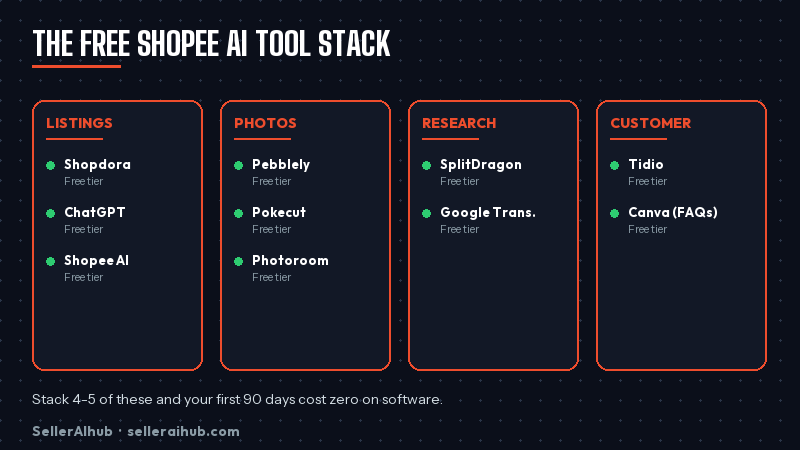
Quick Answer: The best free AI tools for Shopee sellers in 2026 are Shopdora (10 listings/mo free), Pebblely (40 photo credits free), ChatGPT free tier, Canva free, Pokecut free, Photoroom free, SplitDragon’s free keyword lookups, Google Translate, Shopee Seller Centre’s built-in AI, and Tidio free chat. Together they cover listing writing, product photos, keyword research, and customer chat without spending a cent.
How to Use the Best Free AI Tools for Shopee Sellers Without Going Broke
Free tiers have real limits — credit caps, watermarks, or missing advanced features. The way to extract full value is to stack multiple free tools rather than maxing out one. Use ChatGPT for listing text, Pebblely for photos, SplitDragon free lookups for keywords. Each covers a different job, each stays within its free limit, and your total monthly cost stays SGD 0.
The 10 Best Free AI Tools for Shopee Sellers in 2026
1. Shopdora (Free Tier) — AI Listing Generator
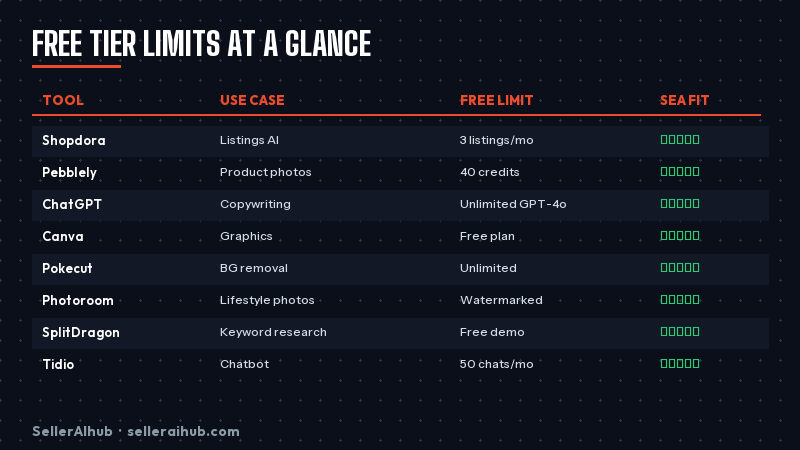
Shopdora’s free plan covers 10 AI-generated listings per month, which is enough to optimise a small store’s core catalogue over a quarter. Connects directly to Shopee via OAuth and pushes updates in one click. See our Shopdora tutorial for beginners for setup steps. Free limit: 10 listings/month. Best for: writing SEO-optimised Shopee listings.
2. Pebblely — AI Product Photos
Pebblely’s free tier gives you 40 image generations — plenty to test 5–8 product photo variations. Upload a product shot, pick a background style, download watermark-free results. See our full Pebblely review. Free limit: 40 credits total (one-time, not monthly). Best for: lifestyle backgrounds and seasonal refreshes.
3. ChatGPT (Free Tier) — General-Purpose Writing
The free ChatGPT tier handles Shopee listing rewrites, description bullet generation, and FAQ drafting. The key is a good prompt — see our guide on how to write Shopee product descriptions with AI. Free limit: usage-capped per session. Best for: versatile writing tasks.
4. Canva Free — Thumbnails and Graphics
Canva’s free plan covers Shopee-sized templates (1024×1024), AI background removal, and Magic Resize. The paid Pro plan adds Magic Edit, but 90% of what a small Shopee seller needs sits inside the free tier. See Canva AI for Shopee product photos. Free limit: usage-generous, some AI features capped. Best for: thumbnails, promo banners, listing infographics.
5. Pokecut (Free Tier) — Photo Background Tool
Pokecut’s free tier handles unlimited background removal and gives you a handful of AI background generations per month. Lighter-weight than Photoroom but faster for bulk edits. See our Pokecut review. Free limit: unlimited removals, limited AI backgrounds. Best for: clean white backgrounds at scale.
6. Photoroom Free — Watermark-Free Basic Edits
Photoroom’s free tier removes backgrounds cleanly and exports watermark-free at web resolution — enough for Shopee thumbnails. You lose batch editing and HD exports, but for single-product touch-ups it’s plenty. See our Photoroom review. Free limit: web-resolution exports, one-at-a-time. Best for: quick single-image cleanup.
7. SplitDragon (Free Lookups) — Keyword Research
SplitDragon’s free tier gives you daily keyword lookups that show Shopee-specific search volume. Not enough to build a full keyword strategy, but perfect for validating 3–5 primary keywords before you write a listing. See our SplitDragon keyword research guide. Free limit: daily cap on lookups. Best for: validating primary keywords before writing.
8. Google Translate — SEA Market Localisation
Not flashy, but irreplaceable. If you sell across SG, MY, PH, TH, and ID, Google Translate’s free API and web tool handle draft translations for listings and buyer messages. Always have a native speaker review before publishing — auto-translate gets idioms wrong — but it cuts 80% of the work. Free limit: usage-generous. Best for: cross-market listing drafts.
9. Shopee Seller Centre Built-In AI Features
Free and already in your dashboard. Shopee rolled out built-in AI listing suggestions, Listing Quality Score hints, and an AI title generator in 2026. They’re not the best tools, but they’re integrated and free. Use them as a floor, then layer Shopdora or ChatGPT for quality. Free limit: unlimited. Best for: quick baseline optimisation.
10. Tidio Free — Customer Chat
Tidio’s free plan handles 100 AI-answered chats per month — enough for a small store to automate common questions (shipping time, sizing, returns). Integrates with Shopee via widgets on external sites; inside Shopee itself you’re still on Shopee Chat. See our Tidio review. Free limit: 100 AI conversations/month. Best for: post-purchase question automation.
Tools That Market Themselves as Free but Aren’t
A fair warning — some tools advertise “free” but the free tier is effectively unusable:
- “Free trial” tools. 7–14 day trials that require a credit card and auto-charge. These aren’t free AI tools — they’re paid tools with a sampler.
- Free tiers with watermarks on exports. You can’t publish Shopee listings with watermarked images. The tool is unusable without paying.
- Free tiers capped at 1–2 uses/month. Not enough to build a workflow. Real free tiers need to cover meaningful weekly usage.
- “Freemium” apps that paywall the save/export function. You can build, but you can’t take the result out. Avoid.
The 10 tools above all pass those filters. Their free tiers genuinely get work done.
When to Upgrade From Free to Paid
Upgrade the moment one of these becomes true:
- You’re spending more than 2 hours/week juggling free-tier limits across tools. Paid plans pay for themselves in time saved.
- Your store crosses SGD 3K monthly revenue. Tool costs become a rounding error against that volume.
- You need features only the paid tier offers (bulk edit, HD exports, advanced analytics) and they directly drive more sales.
Until then, stick with the best free AI tools for Shopee sellers. The tools that deserve your money are the ones you’ve already stretched to their free-tier limit.
FAQ: Best Free AI Tools for Shopee Sellers
Can I really run a Shopee store using only free tools?
Yes, especially in the first 90 days. Stack 4–5 of the free tools above and you can write listings, generate photos, research keywords, and handle basic customer chat without spending anything on software. Your costs at that stage are inventory, shipping, and marketplace fees — not tools.
Which free AI tool should I install first?
Start with Shopdora’s free tier for listings and Pebblely’s free credits for photos — those two cover the biggest time-sinks for new sellers. Add Canva and ChatGPT next for broader creative work.
Are these free AI tools safe for my Shopee account?
The tools that connect to Shopee (Shopdora, Tidio) use official OAuth flows — the same authorisation channel Shopee approves for all third-party tools. They can’t touch your payouts or inventory directly. Stand-alone tools (Canva, ChatGPT, Pebblely) don’t connect to Shopee at all, so there’s zero account risk.
Will Shopee penalise me for using free AI tools?
No. Shopee has no policy against AI-generated listing content or AI-edited photos. What matters is that the content is accurate and the photos show the real product. Stick to those principles and free tools carry no risk.
How often do these free tiers change?
Most tool vendors tweak free-tier limits 1–2 times per year. This list reflects the state as of early 2026. Check the pricing page before relying on a specific limit — vendors sometimes quietly trim free plans when they add premium features.
Next Steps
Pick 3 tools from this list today and get them set up in the next hour — Shopdora, Canva, and SplitDragon free is a good starter stack. Run them for 30 days, measure the impact on your Shopee metrics, and only pay for the one that proves worth it. For a full view of the paid-tool landscape when you’re ready, see our best AI tools for Shopee sellers 2026 hub.
💬 Join the Discussion
Got a question or seller tip? Drop a comment below.