

This Shopdora tutorial for beginners walks you through the exact steps to sign up, connect your Shopee store, and run your first AI-generated listing — start to finish, under 30 minutes. No prior tool experience required. If you’ve already read our Shopdora review and decided to try it, this is the setup guide to pair with it.
Quick Answer: To get started with Shopdora, sign up at shopdora.com with your seller email, verify your account, connect your Shopee store via OAuth, import your first product, and generate an AI-optimized listing. Most SEA sellers finish the full flow in 20–30 minutes and publish their first Shopdora-optimized listing the same day.
Before You Start This Shopdora Tutorial for Beginners
You’ll move faster if you have these three things ready before opening Shopdora:
- Active Shopee seller account in SG, MY, PH, TH, or ID with at least one live listing.
- Seller Centre login credentials — you’ll authorise Shopdora during setup.
- A target product to test on — pick one mid-performing listing (not your top seller, not your worst). You want a clear before/after.
Shopdora offers a free tier that covers 10 listings per month, which is plenty for this tutorial. You won’t need a paid plan until you’re ready to scale.
Shopdora Tutorial for Beginners: 6-Step Setup
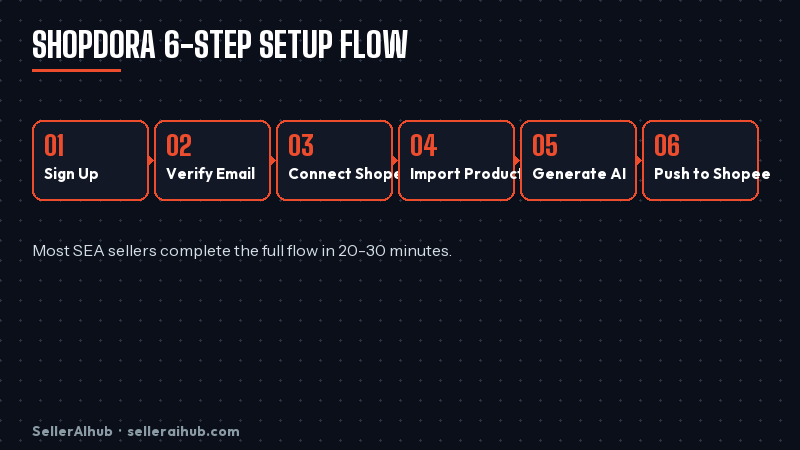
Step 1: Create Your Shopdora Account
Go to shopdora.com and click Sign Up. Use the email tied to your Shopee seller account — it makes later verification cleaner. Pick a strong password, accept the terms, and submit. Shopdora sends a verification link to your inbox within a minute or two.
Step 2: Verify Your Email and Complete Your Profile
Click the verification link, then fill in your seller profile: store name, primary country (SG / MY / PH / TH / ID), and your average monthly SKU count. This drives Shopdora’s regional keyword database — picking the wrong country means worse keyword suggestions later, so get it right the first time.
Step 3: Connect Your Shopee Store
In the Shopdora dashboard, click Connect Store → Shopee. You’ll be redirected to Shopee’s OAuth page. Log in with your Seller Centre credentials and approve the permissions (read listings, read analytics, write updates). Shopdora doesn’t touch payouts or inventory — only listing content. Approval takes one click and you’re back in Shopdora within 10 seconds.
Step 4: Import Your First Product
From the dashboard, click My Products → Import from Shopee. Shopdora pulls your full catalogue in 10–30 seconds. Pick the mid-performing listing you identified earlier. Click Import. You’ll see the product card with current title, images, price, and Shopee Listing Quality Score.
Step 5: Run the AI Listing Generator
Click the product, then Generate with AI. Shopdora asks three quick questions: main target keyword, buyer type (bargain-hunter, brand-conscious, gift-buyer), and tone (casual, professional, excited). Answer honestly — these shape the output. Click Generate. Shopdora produces an optimised title, description, bullet-list features, and tag suggestions in about 15 seconds.
Step 6: Review and Push to Shopee
Read the AI output line by line. Edit any claims that aren’t accurate for your product — AI tools sometimes invent features. When you’re happy, click Push to Shopee. The listing updates in your Shopee Seller Centre within 60 seconds. Shopee’s index picks up the new content in 24–72 hours.
What to Check After Your First Shopdora Run
Give the listing 7 full days before judging results. Then check these three data points in Shopee Seller Centre:
| Metric | Where to Find It | What a Good Result Looks Like |
|---|---|---|
| Listing Quality Score | My Products → select listing | Increase of 10–20 points vs. pre-Shopdora |
| Search Impressions | Business Insights → Traffic | 15–40% lift within 7–14 days |
| Click-Through Rate | Business Insights → Traffic | Small lift (3–8%) — CTR moves slower than impressions |
If impressions don’t move after 14 days, your keyword choice in Step 5 was likely off. Re-run the generator with a different primary keyword pulled from a Shopee keyword research tool or Shopee search autocomplete.
Common Beginner Mistakes (and How to Avoid Them)
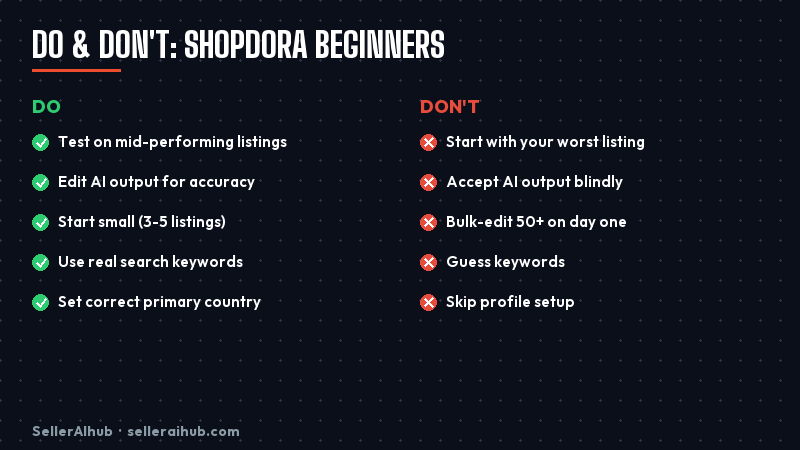
- Picking your worst listing to test on. If it doesn’t rank for other reasons (bad images, wrong category), Shopdora won’t fix those. Pick something average that’s held back by title/description quality.
- Accepting the AI output without editing. Shopdora is a co-writer, not a replacement. Every output needs a 2-minute human pass for accuracy and SEA tone.
- Running it on 50 listings day one. Run 3–5 first, wait 7 days, confirm the lift, then scale. Bulk edits without data = wasted credits.
- Ignoring the keyword question. The primary keyword you pick in Step 5 drives everything downstream. Use a real search query, not a guess.
- Setting the wrong country at profile setup. Keyword databases differ — a Malaysian seller using “SG” as primary country gets Singaporean-biased suggestions.
How the Shopdora Tutorial for Beginners Pays Off
Most beginners see two clear wins in their first month on Shopdora:
- Listing time drops from ~20 minutes to ~5 minutes per product. Write time is the biggest hidden cost for small SEA sellers.
- Keyword coverage improves because the AI surfaces long-tail phrases you wouldn’t think of — especially for cross-market selling (SG buyers use different vocabulary than MY or PH).
The honest caveat: Shopdora optimises listings. It doesn’t fix pricing, fulfilment speed, or review count. If those are your real bottlenecks, a better tool won’t help — address the underlying issue first. See our full Shopdora vs SplitDragon comparison if you’re still deciding between tools.
FAQ: Shopdora Tutorial for Beginners
Is there a free version of Shopdora?
Yes. Shopdora’s free tier covers 10 AI-generated listings per month, which is enough for most beginners to test and measure results before committing to a paid plan.
Does Shopdora work with all SEA Shopee markets?
Shopdora officially supports Shopee SG, MY, PH, TH, and ID. Keyword databases are localised per country, so sellers operating in multiple markets should set the correct primary country in their profile.
Can Shopdora update my listings in bulk?
Yes, but only on paid plans. The free tier runs one listing at a time. Bulk edit is available on the Growth plan upward. For beginners, single-listing mode is better — it forces you to review each AI output before pushing.
Will Shopee penalise me for using an AI tool like Shopdora?
No. Shopee has no policy against AI-generated listing content, and Shopdora uses the official Shopee Open API for updates — the same channel Shopee approves for all third-party tools.
How long until I see ranking changes after a Shopdora update?
Shopee’s index refreshes within 24–72 hours of a listing update. Ranking changes follow over 7–14 days as Shopee collects new click and conversion data. Don’t judge results before two full weeks.
Next Steps
This Shopdora tutorial for beginners gets you to your first optimised listing. From here, run the same six steps on 4 more listings over the next two weeks, compare before/after metrics, and decide whether to upgrade to a paid plan. If you want to compare Shopdora against alternatives, read our Shopdora vs SplitDragon comparison or browse the full best AI tools for Shopee sellers 2026 list.
💬 Join the Discussion
Got a question or seller tip? Drop a comment below.