

You don’t need a paid subscription to find profitable Shopee keywords. The best Shopee keyword research tool free options in 2026 include tools built into Shopee itself, plus a few external tools that cost nothing. The difference between sellers who rank and those who don’t often comes down to which keywords they target — not how much they spend on tools.
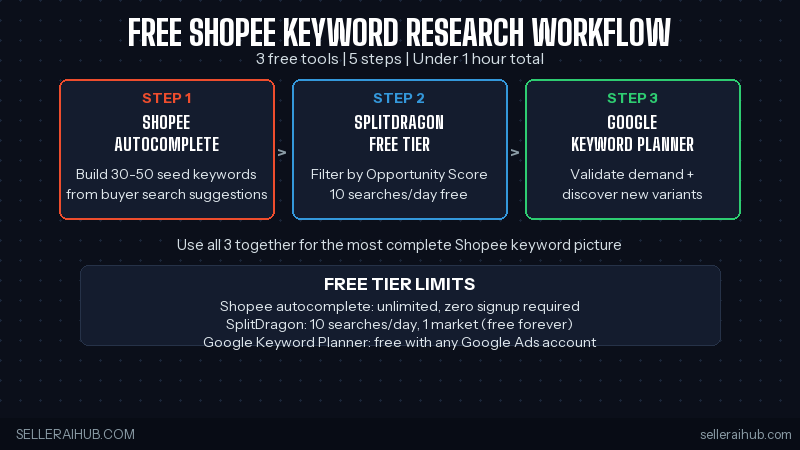
Quick Answer: The best free Shopee keyword research tools in 2026 are: Shopee Search Autocomplete (most accurate, zero cost), SplitDragon free tier (10 searches/day with volume data), and Google Keyword Planner (demand validation, free with Google Ads account). Use all three together for the most complete keyword picture.
Why Keyword Research Matters for Shopee Sellers
Shopee’s search algorithm matches buyer queries to listing titles, descriptions, and tags. A listing with the wrong keywords — or keywords nobody searches — gets no impressions regardless of its quality score. Keyword research tells you what buyers actually type, so you can use those exact phrases in your titles and tags instead of guessing. Even a single keyword swap in your title can double impressions within two weeks.
What to Prepare Before You Start
- A product name or category to research
- Access to Shopee’s search bar (the app or web browser)
- A SplitDragon account (free — takes 2 minutes to set up)
- A Google Ads account (free — for Keyword Planner access)
- A spreadsheet to record your keyword candidates
The 3 Best Free Shopee Keyword Research Tools in 2026
Tool 1: Shopee Search Autocomplete (Free, Most Accurate)
Shopee’s own search bar is the most accurate free Shopee keyword research tool available — because it shows you exactly what buyers in your market are typing, ranked by search frequency. Type your product’s basic name and Shopee will suggest the most-searched variations in real time. The suggestions at the top of the autocomplete list have the highest search volume. Note down every suggestion that’s relevant to your product — these are your highest-value keywords.
How to use it systematically: Start with a broad term (“water bottle”), collect all autocomplete suggestions, then add one attribute at a time (“water bottle stainless”, “water bottle 1 litre”, “water bottle leakproof”) and collect suggestions for each. You’ll build a keyword list of 20–30 candidates in 15 minutes.
Tool 2: SplitDragon Free Tier (10 Searches/Day, Volume + Competition Data)
SplitDragon’s free tier allows up to 10 keyword searches per day and shows estimated search volume plus a competition score for each keyword — data you can’t get from Shopee’s autocomplete alone. Use your autocomplete list as input: take your 20–30 candidates into SplitDragon and check which ones have the best volume-to-competition ratio. The free tier covers one market per day (SG, MY, or PH), so prioritise the market where most of your sales come from.
Tool 3: Google Keyword Planner (Free, Demand Validation)
Google Keyword Planner is free with any Google Ads account (you don’t need to run ads). While it shows Google search data rather than Shopee-specific volumes, it’s useful for two things: validating that a keyword has real-world demand beyond Shopee, and discovering related terms you haven’t thought of. Keywords with high Google volume but low SplitDragon scores are often underserved on Shopee — an opportunity worth testing.
Step-by-Step Free Keyword Research Workflow
Step 1: Build Your Seed List with Shopee Autocomplete
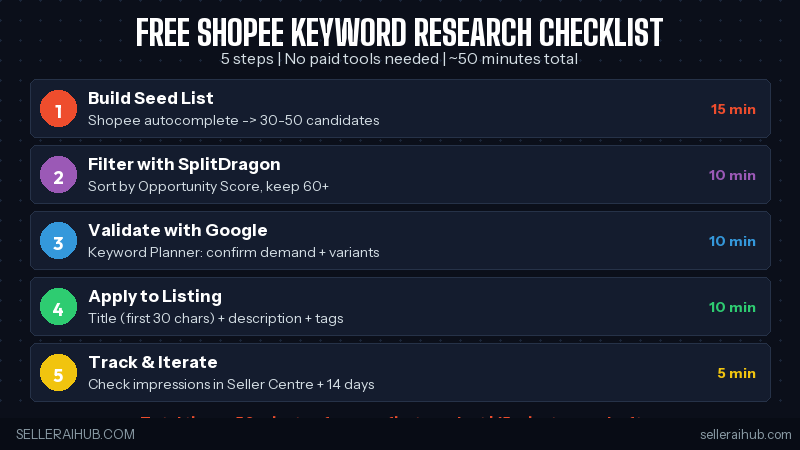
Open Shopee search in your target market and type your product’s most basic name. Write down every autocomplete suggestion — typically 8–12 per query. Then add common attributes one at a time (colour, material, size, use case) and collect suggestions for each variation. Aim for a raw list of 30–50 keyword candidates before moving to the next step.
Step 2: Filter with SplitDragon’s Opportunity Score
Enter your top candidates into SplitDragon’s free keyword search tool (10 per day). Sort results by Opportunity Score. Flag keywords with a score above 60 as “primary candidates.” Keep keywords scoring 40–60 as secondary candidates for your description and tags. Remove anything below 40 — not enough volume to justify the character space in your title.
Step 3: Validate Demand with Google Keyword Planner
Take your top 5 primary candidates into Google Keyword Planner. Check average monthly searches and look at the “related ideas” column — it often surfaces phrasing variations that perform well on Google and haven’t yet been picked up by Shopee sellers. Add any strong new candidates back to your SplitDragon queue for the next day’s 10 searches.
Step 4: Apply Keywords to Your Listing
Assign keywords to your listing using the title formula: primary keyword in the first 30 characters, 2–3 secondary keywords as attributes in the remainder of the title, and long-tail keywords in your product tags (10–13 tags). Add secondary keywords naturally into your first description paragraph — don’t force them. For the full title optimisation guide, read: Shopee Product Title Optimization Tips 2026.
Step 5: Track and Iterate
Check impressions in Seller Centre 14 days after updating your listing. If impressions increased, your new keywords are indexing. If impressions are flat, try replacing the secondary keyword in your title with your next candidate from the list and measure again. Free keyword research is an iterative process — each cycle takes 15 minutes and compounds over time.
Free vs Paid Keyword Tools: When to Upgrade
| Situation | Free Tools Enough? | Upgrade to Paid? |
|---|---|---|
| Under 20 SKUs, single market | Yes | Not yet |
| 20–100 SKUs, researching regularly | 10/day limit becomes a bottleneck | SplitDragon Starter (~SGD 20/mo) |
| 100+ SKUs or multi-market | No — too slow | SplitDragon Pro for unlimited + all markets |
| Competitor keyword tracking needed | No | SplitDragon Pro or Shopdora |
Free Shopee Keyword Research Tools — FAQ
Is SplitDragon completely free to use for Shopee keyword research?
SplitDragon’s free tier is permanently free — 10 keyword searches per day with volume and competition data for one market. There’s no credit card required to sign up. The free tier is enough for sellers researching one product at a time or building a keyword list for a small catalogue. Paid plans start at approximately SGD 20 per month for more searches and multiple markets.
Can I use Google Keyword Planner specifically for Shopee keywords?
Google Keyword Planner shows Google search data, not Shopee-specific volumes. However, it’s useful for discovering demand and finding keyword variations. Cross-reference Google’s suggestions with Shopee autocomplete to confirm which terms buyers actually use on the marketplace. The two data sources complement each other.
How many keywords should I target per Shopee listing?
One primary keyword in your title (first 30 characters), two to three secondary keywords in the remaining title and description opening, and eight to thirteen long-tail keywords in your product tags. Don’t try to squeeze more than one primary keyword into your title — it dilutes the relevance signal and makes titles harder for buyers to read.
Does Shopee penalise keyword stuffing in listings?
Yes. Repeating the same keyword multiple times in a title or description can lower your listing quality score and may trigger Shopee’s content moderation. Each keyword should appear once in the title, once naturally in the first description paragraph, and in relevant product tags. Keyword stuffing was an effective tactic before 2024 — it actively hurts rankings now.
Conclusion
The best free Shopee keyword research tool strategy in 2026 combines three zero-cost sources: Shopee autocomplete for accuracy, SplitDragon’s free tier for volume and competition data, and Google Keyword Planner for demand validation. The five-step workflow above takes under an hour for your first product and under 15 minutes for each additional one once you have the process down.
Once you have your keywords, apply them with the title formula in: Shopee Product Title Optimization Tips 2026. For a deeper dive into the ranking factors your keywords feed into, read: How to Rank Higher on Shopee Search in 2026.
💬 Join the Discussion
Got a question or seller tip? Drop a comment below.