
Quick Answer: Pokecut is a free AI background remover built specifically for Shopee sellers. Our Pokecut review gives it 4 out of 5 — it removes backgrounds cleanly, handles dust, reflections, and stands that other free tools miss, and processes up to 50 photos in one batch, all at no cost. If you’re a Shopee seller on a budget who doesn’t need lifestyle staging, Pokecut is the best free background remover for Shopee available today.
Product photos are non-negotiable on Shopee — but that doesn’t mean you have to pay for them. This Pokecut review for Shopee sellers covers a tool that keeps surprising people: free, fast, accurate, and built with marketplace sellers specifically in mind.
We’ll cover what Pokecut does, how it compares to Photoroom (the most popular paid alternative), whether the free plan is genuinely usable, and which type of Shopee seller benefits most. By the end, you’ll know whether Pokecut belongs in your daily workflow or whether you need to consider a paid option.
What Is Pokecut?
Pokecut is an AI-powered image editing tool built for ecommerce sellers, with a particular focus on Shopee marketplace workflows. It automates the most time-consuming parts of product photo editing: background removal, dust and spot cleanup, reflection removal, and stand or holder erasure.
Unlike general-purpose background removers (remove.bg, Canva), Pokecut was specifically trained on product photography — the kind of photos Shopee sellers actually take. That specialisation shows in its results, especially on common problem areas like fabric texture edges, transparent packaging, and product stands.
Pokecut works on web browser and has mobile apps for iOS and Android. It’s used across SEA by Shopee sellers in Singapore, Malaysia, Philippines, Thailand, and Indonesia.
Pokecut Review: Key Features for Shopee Sellers
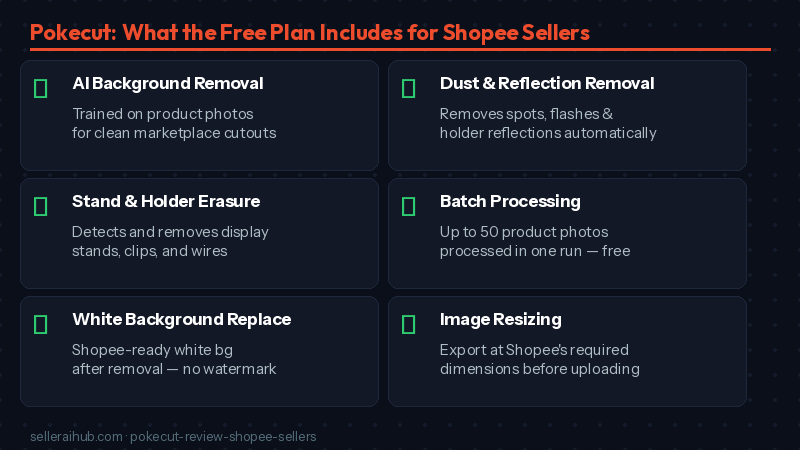
AI Background Removal (Shopee-Optimised)
Pokecut’s background removal is trained on ecommerce product photos, not general photography. In practice, this means it handles the specific challenges that trip up other free tools: thin product straps, fine fabric edges, jewellery with intricate metalwork, and items photographed against non-white or textured surfaces. The cutout you get is clean enough for Shopee’s cover photo requirements straight out of Pokecut.
Dust, Reflection, and Stand Removal
This is what makes Pokecut distinctive from other free tools. When you photograph a product, you almost always pick up: tiny dust particles on the surface, reflections from your phone flash or window, and the stand, wire, or clip you used to hold the item in place. Pokecut has dedicated AI tools to clean all three automatically — not just the background. This saves significant manual retouching time, especially for beauty, fashion accessories, and home goods categories.
Batch Processing — Up to 50 Photos
Upload up to 50 product photos at once and apply the same background removal and cleanup to all of them in a single run. This is especially useful when you’re launching a new collection or updating photos before a Shopee campaign like 9.9, 11.11, or Hariraya. Instead of editing one photo at a time, you process your entire batch and review results.
White Background Replacement
After removing the background, Pokecut lets you replace it with a clean white background — Shopee’s preferred standard for cover photos. You can also apply other solid colours or a transparent background if you need to composite the image elsewhere. The white background output meets Shopee’s minimum requirements for product cover images.
Image Resizing for Shopee
Pokecut includes basic resizing so you can export at Shopee’s required dimensions: minimum 600×600px for cover photos, 900×900px for gallery photos. This eliminates the need for a separate resizing step after background removal.
Pokecut Pricing — Is It Really Free?
Yes — Pokecut is free. Here’s what that means in practice:
| Plan | Cost | What you get | Limitations |
|---|---|---|---|
| Free | $0 | Background removal, dust/reflection/stand removal, batch up to 50 photos, white background replacement, basic resizing, no watermark | Limited to standard resolution output on free plan; processing speed may be slower during peak times |
| Pro (if available) | Check pokecut.com | Higher-resolution exports, priority processing, additional features | Check current plan details at pokecut.com as pricing is periodically updated |
Critically — the free plan does not add a watermark. This makes it genuinely usable for live Shopee listings, unlike many “free” photo tools that watermark your exports and make them unsuitable for publishing. The background removal and batch features work at no cost, which is unusual in this category.
Pokecut vs Photoroom: Which Is Better for Shopee Sellers?
The most common question from Shopee sellers: should I use Pokecut or pay for Photoroom? Here’s the honest comparison:
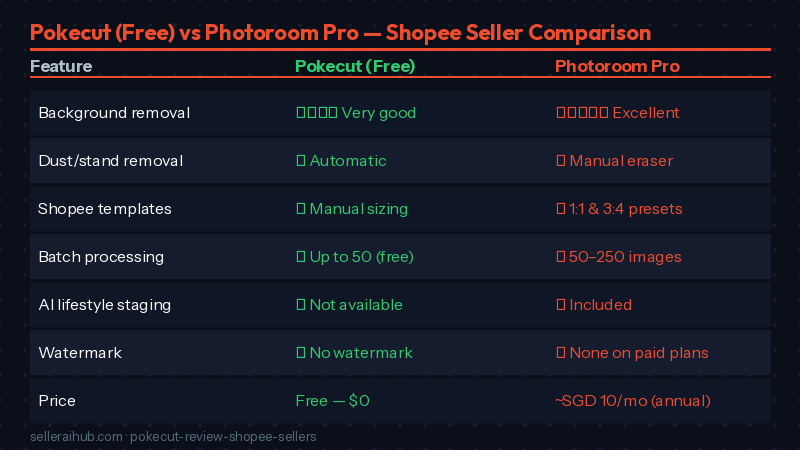
| Feature | Pokecut (Free) | Photoroom (Pro — ~SGD 10/mo) |
|---|---|---|
| Background removal accuracy | ⭐⭐⭐⭐ Very good for ecommerce products | ⭐⭐⭐⭐⭐ Excellent, including complex edges |
| Dust and reflection removal | ✅ Built-in, automatic | ✅ Manual Retouch tool |
| Stand/holder removal | ✅ Automatic | ✅ Magic Eraser (manual) |
| Shopee marketplace templates | ❌ Manual sizing required | ✅ Built-in presets (1:1, 3:4) |
| Batch processing | ✅ Up to 50 photos | ✅ 50–250 photos (Pro/Max) |
| AI lifestyle backgrounds | ❌ Not available | ✅ Included with AI credits |
| Watermark on free exports | ✅ No watermark | ❌ Watermarked on free plan |
| Mobile app | ✅ iOS + Android | ✅ iOS + Android |
| Cost | Free | ~SGD 10/month (annual) |
Our recommendation: If you only need background removal and cleanup for Shopee cover photos and gallery images, Pokecut handles it at $0 and without watermarks. Choose Photoroom if you want Shopee marketplace presets, AI lifestyle staging for gallery images, or batch sizes beyond 50 photos. Many sellers use both: Pokecut for quick daily edits and Photoroom for campaign photo preparation.
What We Like
- Genuinely free with no watermark. The most important thing about Pokecut is that the free plan produces export-ready images — no watermark, no credit badge, nothing that would make the photo unusable on a live Shopee listing.
- Dust and stand removal are automatic. Most background removers just cut the background. Pokecut also removes the common photographic artifacts that make product shots look unprofessional. This automated cleanup is rare in free tools.
- Built for product photography specifically. The AI was trained on ecommerce product images, not general photography. This shows in edge accuracy on fabric, jewellery, and packaged goods — products that often challenge generic background removers.
- Batch up to 50 photos for free. The free batch limit of 50 photos covers the full workflow of most small and mid-sized Shopee stores before major sale campaigns.
What Could Be Better
- No Shopee-specific templates. You get background removal and resizing, but there are no one-click templates set to Shopee’s 1:1 or 3:4 ratios. You need to manually set the export dimensions each time.
- No AI lifestyle staging. Pokecut replaces backgrounds with white or solid colours — it doesn’t generate lifestyle scenes the way Flair AI does. If you want gallery photos showing your product in a styled setting, you’ll need a separate tool.
- Processing speed varies. During peak hours, batch processing can slow down. For sellers who need to update photos quickly before a flash sale or campaign, this can be frustrating.
- Documentation is limited. The help centre is thinner than Photoroom’s. If you run into an issue, you may need to experiment to find the solution rather than finding a specific support article.
Frequently Asked Questions About Pokecut for Shopee Sellers
Is Pokecut really free? What’s the catch?
Pokecut is free with no watermark on standard-resolution exports. There’s no hidden trial period that expires. The practical limitation is that free exports may be at a lower resolution than paid options, and processing speed during busy periods may be slower. For most Shopee sellers using the tool for product photos, this doesn’t cause real problems.
Does Pokecut work for all product categories on Shopee?
Pokecut works well for most product categories including fashion, accessories, home goods, beauty and skincare, and small electronics. It performs best on products photographed against a contrasting background. Very complex products with transparent materials, fine mesh, or intricate metalwork may need additional manual refinement after the automated removal.
Can I use Pokecut to remove photo stands from Shopee product shots?
Yes — stand and holder removal is a dedicated Pokecut feature. If you photograph products on a stand or clip, Pokecut’s AI detects and removes the holder automatically as part of the editing process. This is especially useful for apparel sellers who photograph on hangers or mannequins, and jewellery sellers who use display stands.
Is Pokecut safe to use for my Shopee product photos?
Yes. Pokecut processes images on its servers and does not share your product photos with third parties. For standard Shopee product images, there is no sensitive data involved. If you’re concerned about proprietary product designs, check Pokecut’s current privacy policy at pokecut.com before uploading.
Pokecut Verdict: Best Free Background Remover for Shopee Sellers
Our Pokecut review for Shopee sellers gives it 4 out of 5.
For a free tool, Pokecut does more than it has any right to. Background removal is accurate for most Shopee product types, the automatic dust, reflection, and stand cleanup saves real editing time, and the 50-image batch limit covers a meaningful workload at no cost. The absence of a watermark on free exports is what makes it genuinely usable — not just a teaser.
The gaps are clear: no Shopee marketplace presets, no lifestyle staging, and some resolution limitations on the free plan. If you need those features, Photoroom’s Pro plan at SGD 10/month is the upgrade path. But if you’re just starting out, running a small store, or want to cut costs without sacrificing photo quality, Pokecut is the best free background remover for Shopee sellers available right now.
Start with Pokecut on your next product photo batch. If you find yourself wanting Shopee-specific templates or lifestyle gallery images, our full AI product photo tool comparison covers all your options side by side.