
Quick Answer: The safest AI product photo tool for Shopee is the one that helps your store create accurate, clear, policy-friendly images. Start with a clean cover image, then use AI only for background cleanup, resizing, lighting correction, and gallery scenes that do not change the product being sold.
Product photos can lift or sink a Shopee listing before buyers read the title. But AI photo tools also create risk when they change color, size, texture, packaging, included accessories, or the buyer’s expectation. This guide helps SEA sellers choose an AI product photo tool for Shopee without making misleading edits.
Use it as an image QA workflow for Singapore, Malaysia, the Philippines, Thailand, and Indonesia. The goal is simple: make product images clearer, more consistent, and easier to inspect on mobile.
AI Product Photo Tool for Shopee: What Good Images Must Do
A good Shopee image should show the actual product clearly. Shopee Mall guidance says product images should be clear, sharp, realistic in color, and free from reflections of people or objects. Cover images should use a solid background where possible, keep the full product in frame, and avoid clutter that blocks inspection.
| Image task | Safe AI use | Risk to avoid |
|---|---|---|
| Cover cleanup | Remove background clutter and improve lighting. | Changing product color, shape, or included items. |
| Square crop | Resize to a clean marketplace-friendly square. | Stretching or compressing the product. |
| Gallery scene | Add use-case context for images after the cover. | Showing props or settings that imply false benefits. |
| Infographic | Add dimensions, materials, or care notes that are verified. | Adding unsupported claims, badges, or fake certifications. |
| Batch editing | Apply consistent background and export settings. | Approving bulk outputs without checking each SKU. |
Shopee Image Rules to Keep in Mind
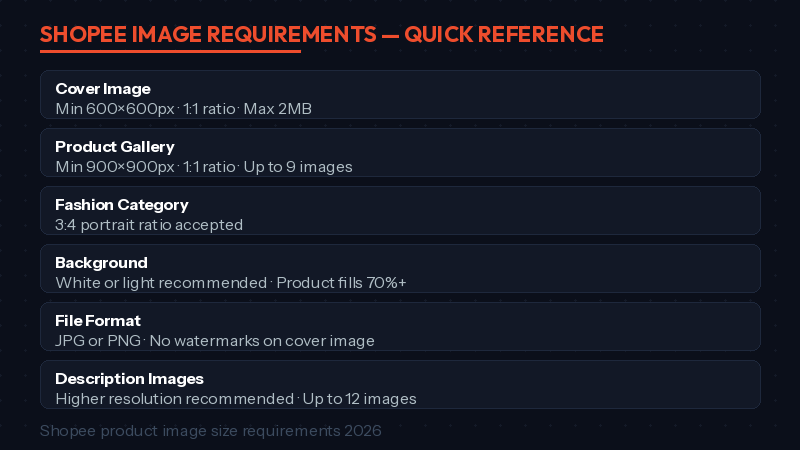
Rules can vary by category and market, so always check Seller Centre for your listing. As a safe baseline, use high-resolution square images, show the entire product clearly, avoid duplicate images, and keep the cover image focused on the item being sold.
- Use a clear product photo with realistic color.
- Keep the full item visible in the cover image.
- Avoid watermarks, borders, montages, or text that blocks the product.
- Use lifestyle scenes mainly in gallery images, not as a misleading cover.
- Show different angles, details, size, packaging, or use cases.
- Check category-specific rules for fashion, beauty, health, electronics, and regulated products.
For official guidance, review Shopee’s Mall Listing Guidelines and the Shopee Uni Basic seller deck. These are better sources than old tool marketing claims.
How to Choose an AI Photo Tool
Do not choose a tool only because a blog says it is the best. Choose based on the image problem in your store.
| Your problem | Tool type to consider | What to test first |
|---|---|---|
| Messy backgrounds | Background remover. | Edge quality around hair, glass, jewelry, fabric, and packaging. |
| Many similar SKUs | Batch editor. | Whether exports stay consistent across variants. |
| Weak gallery images | AI scene generator. | Whether scenes still show the real product accurately. |
| Fashion or apparel | Try-on or model image tool. | Whether fit, color, length, and fabric look truthful. |
| Promo campaigns | Design editor with templates. | Whether text and badges remain readable on mobile. |
Use an AI product photo tool for Shopee only after a manual check
AI can clean a photo quickly, but the seller still owns the listing accuracy. Before uploading, compare the edited image against the real item, supplier image, packaging, and variant selected in Seller Centre.
Tool Options Without Overclaiming
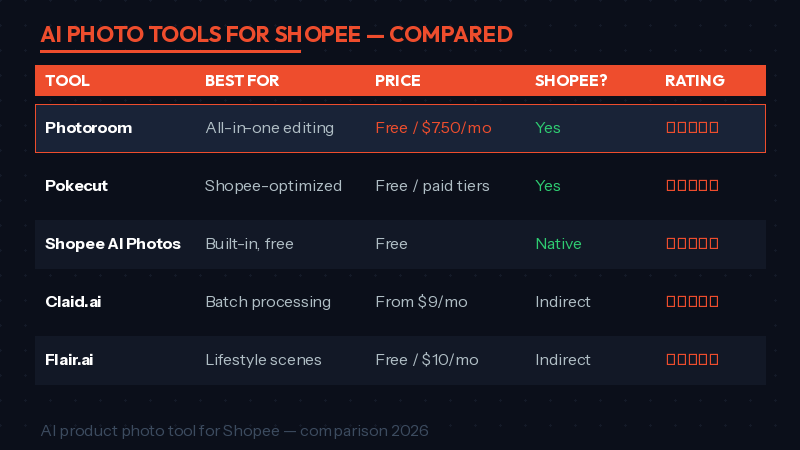
Different tools fit different workflows. Pricing, limits, and marketplace presets change often, so verify each tool’s current page before committing budget.
| Tool type | Useful for | Check before using |
|---|---|---|
| Photoroom-style editor | Background removal, clean product cutouts, marketplace exports. | Watermarks, export size, batch limits, and edge quality. |
| Pokecut-style cleanup | Simple product cleanup, background removal, and quick mobile edits. | Whether the edited image keeps accurate color and texture. |
| Canva-style design suite | Infographics, size charts, banners, and campaign visuals. | Whether templates add too much text for a cover image. |
| Pebblely or Flair-style scene tool | Lifestyle gallery images and seasonal backgrounds. | Whether props imply false contents or product scale. |
| Shopee built-in image tools | Quick checks inside the seller workflow when available. | Feature availability by market, category, and account. |
A 7-Step Image QA Workflow
- Pick a live listing with impressions but weak CTR.
- Save the current cover image, gallery images, and performance baseline.
- Use AI to clean background, crop, lighting, or gallery context.
- Check the edited image against the real SKU and selected variant.
- Preview the listing on mobile before saving.
- Record the edit date and what changed.
- Review impressions, CTR, conversion, returns, and buyer questions after 7-14 days.
This makes the tool useful without pretending it can guarantee better rankings. If CTR improves but conversion drops, the image may be attracting clicks without setting the right expectation.
What Not to Edit with AI
- Do not change the product’s actual color or material.
- Do not remove flaws that buyers should know about.
- Do not add accessories that are not included.
- Do not show size, volume, or scale inaccurately.
- Do not create fake certifications, awards, or before-after results.
- Do not use a model image that misrepresents fit or coverage.
Internal Links for the Full Listing Workflow
Images work best when the rest of the listing is also clear. Pair this guide with rank higher on Shopee search, write Shopee product description with AI, and Canva AI for Shopee product photos.
Frequently Asked Questions
What is the safest AI product photo tool for Shopee?
The safest tool is one that keeps the real product accurate while improving background, crop, lighting, and export quality. Test with one SKU before using it across your catalogue.
Can Shopee reject AI-edited product photos?
Shopee reviews images based on listing rules and buyer accuracy, not only the editing method. AI-edited images can still be risky if they are misleading, cluttered, low quality, or category-inappropriate.
Should I use AI scenes as my cover image?
Usually, a clear product-focused cover is safer. Use lifestyle or AI scenes in gallery images when they help explain use case, scale, or styling without changing buyer expectations.
Do I need a paid photo tool?
Not always. Start with the smallest workflow that solves your image problem. Upgrade only when batch editing, cleaner exports, or team workflows save enough time to justify the cost.
How do I measure whether new images helped?
Compare the same listing before and after the change. Track impressions, CTR, conversion, returns, and buyer questions. One image change is easier to judge than five changes at once.
Final Takeaway
An AI product photo tool for Shopee is useful when it makes the real product easier to inspect. It becomes risky when it makes the product look better than what the buyer will receive. Keep edits honest, test on visible listings first, and use Seller Centre data to decide what to scale.
💬 Join the Discussion
Got a question or seller tip? Drop a comment below.