
Key Features We Tested
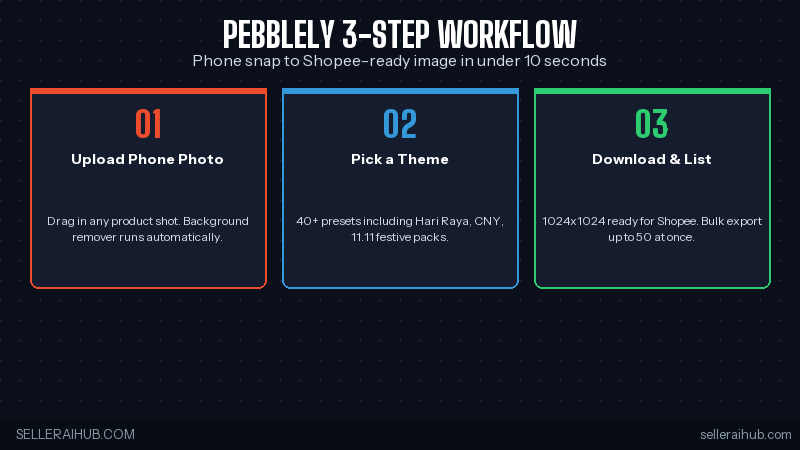
1. One-Click Background Removal
What We Like
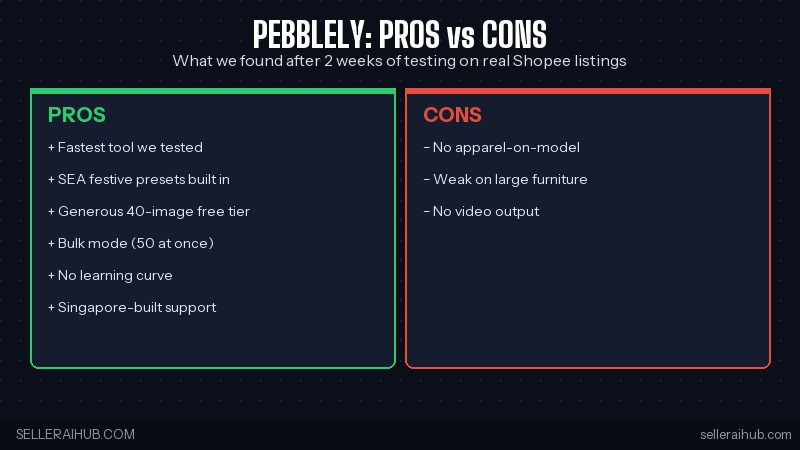
- Speed — under 10 seconds per image, no other tool we tested matched this.
- Festive packs — Hari Raya, CNY, 11.11 themes built in for SEA sellers.
- Bulk mode — 50 images in one upload, huge time saver for sale prep.
- Free tier — 40 images monthly is generous and recurring.
- No learning curve — your store assistant can use it on day one.
What Could Be Better
- Apparel on models — Pebblely is built for product-only shots. It can’t add clothes onto AI models, so fashion sellers will need a separate tool (try Flair AI for that).
- Large furniture — sofas, beds, and bulky items often look pasted into the scene rather than naturally placed.
- No video output — image-only, so TikTok Shop sellers still need a video tool alongside it.
Who Should Use Pebblely?
| ✅ Best if you… | ❌ Skip if you… |
|---|---|
| Sell beauty, accessories, gadgets, F&B | Sell apparel that needs a model |
| Shoot products on your phone | Already have studio photography |
| Run 9.9, 10.10, 11.11 sales and need festive thumbnails | Sell large furniture or bulky items |
| Manage 50–500 SKUs as a solo seller | Need video content for TikTok Shop |
Pebblely vs Photoroom
Pebblely Review FAQ
Is Pebblely free?
Yes, the free plan gives you 40 image generations per month — enough to refresh your top listings. Paid plans start at SGD $25/month for 1,000 images.
Does Pebblely work for Shopee Singapore and Malaysia?
Yes. Pebblely is Singapore-built and works globally. Output dimensions match Shopee’s recommended 1:1 (1024×1024) and Lazada’s product image specs out of the box.
Can I use Pebblely images commercially on Shopee?
Yes — all paid plans grant full commercial rights. The free plan is for personal/testing use, so upgrade before listing.
Is Pebblely better than Photoroom?
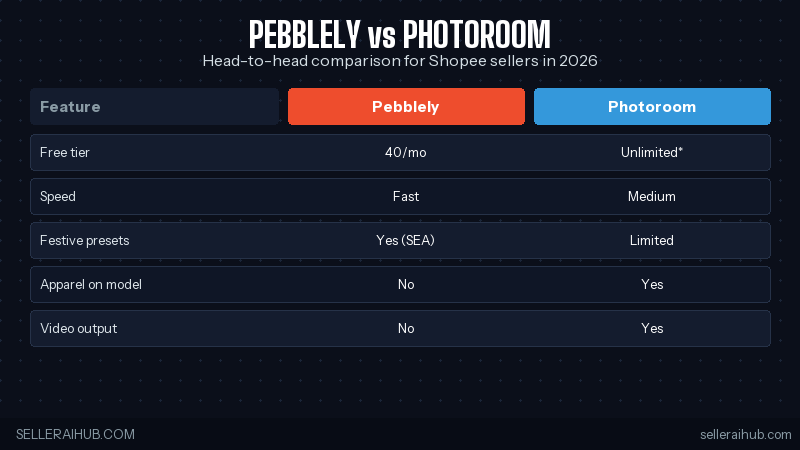
For product-only shots and bulk SEA sale prep, yes. For apparel on models and video, Photoroom wins. Most sellers use both — Pebblely for 80% of listings, Photoroom for the rest.
How long does Pebblely take to learn?
Under 10 minutes. Upload, click a theme, download. There’s no training, no complex settings, no Photoshop knowledge needed.
Verdict: Should You Use Pebblely in 2026?
Yes — for most Shopee, Lazada, and TikTok Shop sellers running solo or with a small team. Pebblely is the fastest path from phone snap to listing-ready image, and the SEA festive presets give it a real edge over global competitors. The free tier alone is worth signing up for. Upgrade only when you cross 40 images a month.
Want to compare it head-to-head with the rest of the photo tool stack? Read our best AI tools for Shopee sellers 2026 roundup or jump straight to the AI product photo tool comparison.
Ready to try it? Start free at pebblely.com — no credit card needed.
💬 Join the Discussion
Got a question or seller tip? Drop a comment below.