

Finding the right keywords for your Shopee listings takes hours when done manually — and guessing wrong means paying for Boost on terms nobody searches. SplitDragon Shopee keyword research cuts that process to minutes: it pulls real Shopee search data, shows competition levels, and surfaces long-tail terms your competitors have missed.
Quick Answer: SplitDragon is a keyword research tool built specifically for Shopee and Lazada sellers in SEA. Enter a seed keyword, and it returns search volume, competition score, and related terms ranked by opportunity. Most sellers find 5–10 actionable keywords per product in under 10 minutes.
What Is SplitDragon and Why Use It for Shopee Keyword Research?
Unlike generic SEO tools built for Google, SplitDragon pulls data directly from Shopee’s search engine. That means the volumes and competition scores reflect what buyers actually type on Shopee — not Google traffic estimates that don’t translate to marketplace behaviour. It covers SG, MY, PH, TH, and ID markets, making it one of the few tools built for the SEA seller context.
What to Prepare Before Starting
- A SplitDragon account (free tier available; paid plans from ~SGD 20/month)
- A list of your top 10 products by sales or impressions
- 1–2 seed keywords per product (what you currently call the product)
- Your target Shopee market selected (SG, MY, PH, etc.)
How to Use SplitDragon for Shopee Keyword Research: Step by Step
Step 1: Enter Your Seed Keyword
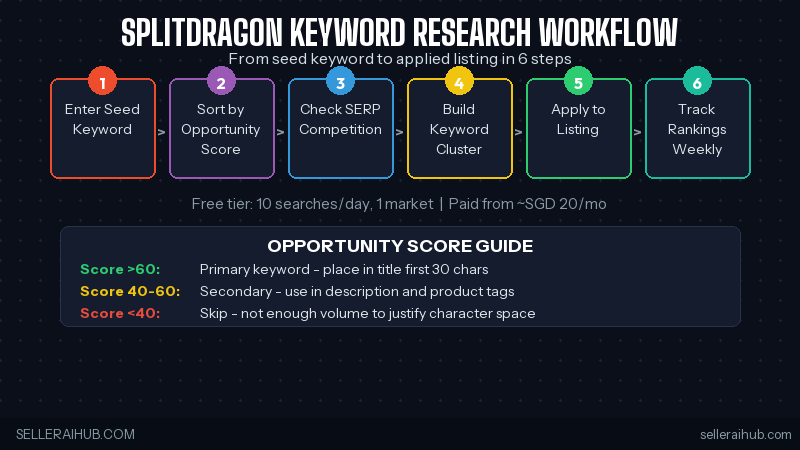
Log in to SplitDragon and select Keyword Research from the dashboard. Enter your seed keyword — the most basic description of your product (e.g. “water bottle”). Select your target market (SG, MY, PH, TH, or ID) and click Search. SplitDragon will return a list of related keywords with search volume and competition data sourced from Shopee.
Step 2: Sort by Opportunity Score
SplitDragon’s Opportunity Score combines search volume and competition into a single number. Sort your results by Opportunity Score descending. Focus on keywords with a score above 60 — these have enough search volume to drive traffic, but low enough competition that a well-optimised listing can rank on page one within 2–4 weeks.
Step 3: Check the SERP for Each Candidate Keyword
Click any keyword to see the current top-10 listings for that term. Look at the listing quality scores and review counts of page-one results. If the top results have under 50 reviews and quality scores below 80, your listing can compete immediately. If every result has 500+ reviews, note the keyword for future use once your listing has more social proof.
Step 4: Build a Keyword Cluster Per Product
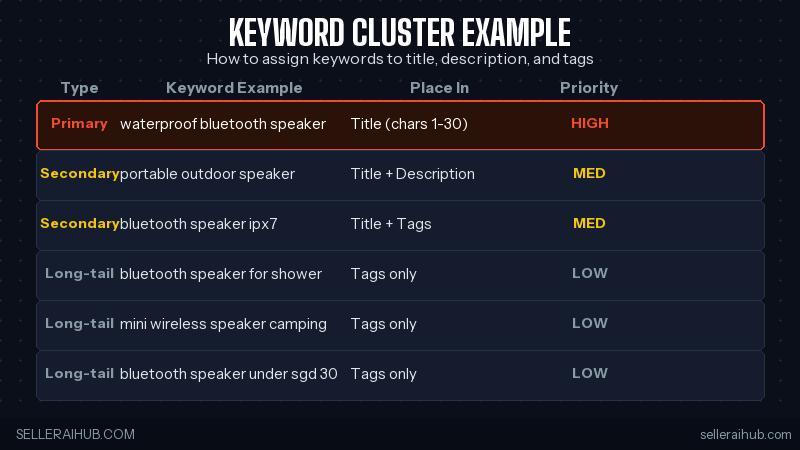
For each product, aim to identify: one primary keyword (highest volume, goes in your title first), two secondary keywords (go in title attributes and first description line), and five to eight long-tail keywords (go into your product description and tags). SplitDragon’s “Related Keywords” tab surfaces these automatically — export the list to a spreadsheet for easy reference.
Step 5: Apply Keywords to Your Listing
Use your primary keyword in the first 30 characters of your title. Place secondary keywords in the remainder of the title and the first sentence of your description. Add your long-tail keywords to product tags (10–13 tags per listing). For a full guide on applying these in your title, read: Shopee Product Title Optimization Tips 2026.
Step 6: Track Rankings Weekly
Use SplitDragon’s Rank Tracker to monitor your listing’s position for each keyword you’re targeting. Check weekly for the first month after optimising. Most listings show movement within 7–14 days. If a keyword isn’t moving after 3 weeks, either the competition is harder than the score suggested, or your listing quality score needs improvement — check Seller Centre for gaps.
SplitDragon Pricing for SEA Sellers (2026)
| Plan | Price | Key Limits | Best For |
|---|---|---|---|
| Free | SGD 0 / MYR 0 | 10 searches/day, 1 market | Testing the tool, new sellers |
| Starter | ~SGD 20/mo | 100 searches/day, 2 markets | Single-market sellers, small catalogue |
| Pro | ~SGD 40/mo | Unlimited searches, all SEA markets | Multi-market sellers, 50+ SKUs |
Prices shown are approximate SGD equivalents. Check SplitDragon’s website for current pricing in MYR and PHP.
SplitDragon Shopee Keyword Research — FAQ
Is SplitDragon free to use for Shopee keyword research?
Yes, SplitDragon has a free tier that allows up to 10 keyword searches per day in one market. For most new sellers building a keyword list for the first time, the free tier is enough to get started. Paid plans unlock more daily searches, multi-market data, and the rank tracker.
Does SplitDragon work for Lazada keyword research too?
Yes. SplitDragon supports both Shopee and Lazada keyword data. You can switch between platforms in the search settings. Note that search behaviour differs between the two platforms, so run separate keyword research for each even if you sell the same products on both.
How accurate is SplitDragon’s search volume data?
SplitDragon pulls data from Shopee’s own search engine, so volume figures reflect actual marketplace searches rather than estimates. The data is typically 2–4 weeks behind real-time. Use it to compare relative keyword demand rather than as an exact monthly figure.
Can beginners use SplitDragon without SEO knowledge?
Yes. The Opportunity Score removes the need to manually interpret volume and competition data. Sort by score, pick the top candidates, check the SERP, and apply the keywords to your listing. Most new sellers are up and running within one session.
Conclusion
For SplitDragon Shopee keyword research, the six-step workflow above — seed keyword, opportunity sort, SERP check, cluster build, apply, track — gives you a repeatable process for every product in your catalogue. Start with your five highest-volume listings and build keyword clusters for each. Most sellers see ranking movement within two weeks of applying the results.
Want to understand the ranking signals your new keywords feed into? Read: How to Rank Higher on Shopee Search in 2026.
💬 Join the Discussion
Got a question or seller tip? Drop a comment below.