

This ShopeeGPT chrome extension review covers the free ChatGPT-powered listing optimizer that runs inside Shopee Seller Centre — what it does well, where it breaks, and whether SEA sellers in 2026 should install it. Tested on 12 listings across Singapore and Malaysia stores in the beauty, gadgets, and home categories.
Quick Answer: ShopeeGPT is a free Chrome extension that uses ChatGPT to rewrite your Shopee titles and descriptions inside Seller Centre. It works, it’s genuinely free, and it saves real time on day-to-day listing work. The output needs editing — don’t accept titles blindly — but for zero dollars it’s a strong addition to any SEA seller’s stack.
What is ShopeeGPT?
ShopeeGPT is a free Chrome extension that adds AI listing optimization buttons directly inside Shopee Seller Centre. Once installed, you’ll see “Generate Title” and “Generate Description” buttons on the listing edit page. Click, and ChatGPT rewrites the field based on your current product info plus keywords you select.
It’s built on the OpenAI API but the developer absorbs the cost — there’s no paid plan and no usage cap visible to the user. The extension also includes a basic keyword finder and a one-click export to .doc.
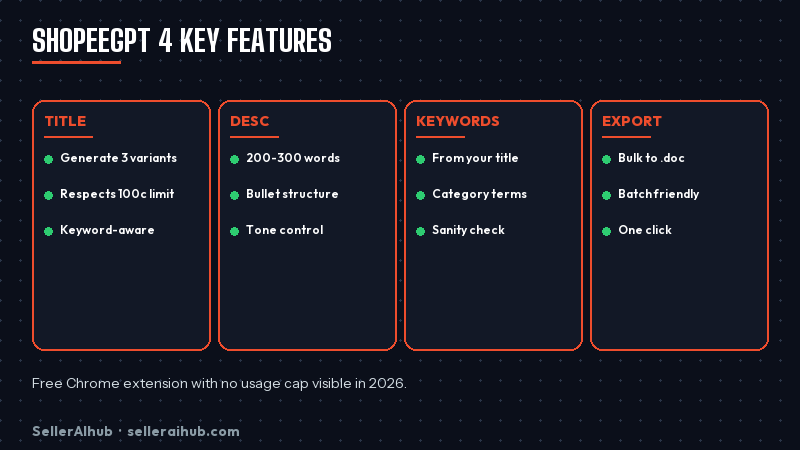
ShopeeGPT chrome extension review: features tested
Title generator
You pick 3-5 keywords from the suggestion list, click Generate Title, and ShopeeGPT outputs three title variants. Quality is decent — better than ChatGPT in a separate tab because the prompt is tuned for Shopee’s 100-character limit and keyword-stuffing tolerance. Expect to use option 1 or 2 with light edits about 70% of the time.
Description generator
This is the strongest feature. Pick keywords, set tone (casual or formal), and the extension produces a 200-300 word description with bullet points and a call-to-action. The output is well-structured and actually reads like a Shopee listing rather than generic AI prose.
Keyword finder
Limited. The keyword suggestions are pulled from your existing title and description, plus some generic category terms. It won’t find new long-tail queries the way Shopdora or SplitDragon can. Treat ShopeeGPT’s keyword finder as a sanity check, not a research tool.
Export to .doc
Useful for batch work. You can generate optimized content for 5-10 listings, export them all, and paste back into Seller Centre in one session. Saves clicking around.
ShopeeGPT pros and cons
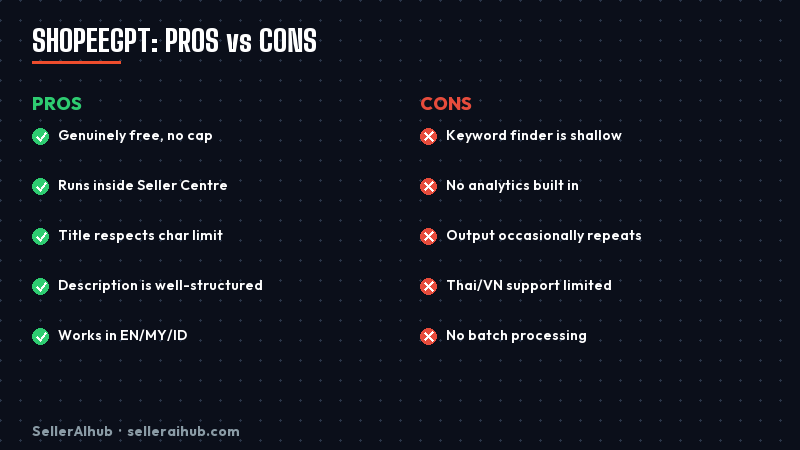
Pros
- Genuinely free with no usage cap
- Runs inside Seller Centre — no copy-paste friction
- Title output respects Shopee’s character limit
- Description output is well-structured
- Works in English, Bahasa Malaysia, Bahasa Indonesia
Cons
- Keyword finder is shallow — no real search volume data
- No analytics or A/B testing built in
- Output occasionally repeats phrases across listings
- Thai and Vietnamese support is limited
- No batch processing — one listing at a time inside the editor
How to install ShopeeGPT
- Open the Chrome Web Store and search “ShopeeGPT”
- Click Add to Chrome and confirm permissions
- Log in to Shopee Seller Centre as normal
- Open any product edit page — ShopeeGPT buttons appear next to title and description fields
- No API key needed; the extension handles authentication
ShopeeGPT vs Shopdora vs Shopee’s built-in AI
| Tool | Cost | Listing AI | Keyword data | Best for |
|---|---|---|---|---|
| ShopeeGPT | Free | Title + Desc | Shallow | Day-to-day rewrites |
| Shopdora | Free tier + paid | Full listing | Real volume data | Research-driven sellers |
| Shopee built-in AI | Free | Photo-to-listing | None | New sellers without copy |
The realistic stack: use Shopee’s built-in AI for first drafts of brand-new listings, ShopeeGPT for daily rewrites and refreshes, Shopdora when you need real keyword volume data.
Should SEA sellers install ShopeeGPT in 2026?
Yes, with low risk. It’s free, it doesn’t connect to your Shopee credentials beyond reading the page DOM, and the worst case is you uninstall it. For sellers spending more than 30 minutes a week on listing copy, the time saved on the description generator alone justifies the install.
FAQ: ShopeeGPT chrome extension review
Is ShopeeGPT actually free?
Yes, fully free with no usage cap visible. The developer absorbs the OpenAI API cost. There’s no paid tier in 2026.
Is the ShopeeGPT extension safe to install?
It only requires permission to read the Shopee Seller Centre page. It does not access your Shopee password or payment info. The extension has good ratings on the Chrome Web Store.
Does ShopeeGPT work in Singapore, Malaysia, Philippines, Thailand, Indonesia?
It works wherever Shopee Seller Centre runs. Output quality is best in English, Bahasa Malaysia, and Bahasa Indonesia. Thai and Vietnamese output is rougher.
Can ShopeeGPT replace Shopdora or SplitDragon?
No. ShopeeGPT only optimizes copy. It has no real keyword research, no competitor tracking, no analytics. Pair it with a research tool, don’t replace.
How does ShopeeGPT compare to Shopee’s built-in AI listing generator?
Shopee’s built-in AI is better for brand-new listings — it generates everything from one product photo. ShopeeGPT is better for editing existing listings because you control which keywords go in.
Related: Shopdora review · SplitDragon keyword research · Best AI tools for Shopee sellers
💬 Join the Discussion
Got a question or seller tip? Drop a comment below.