

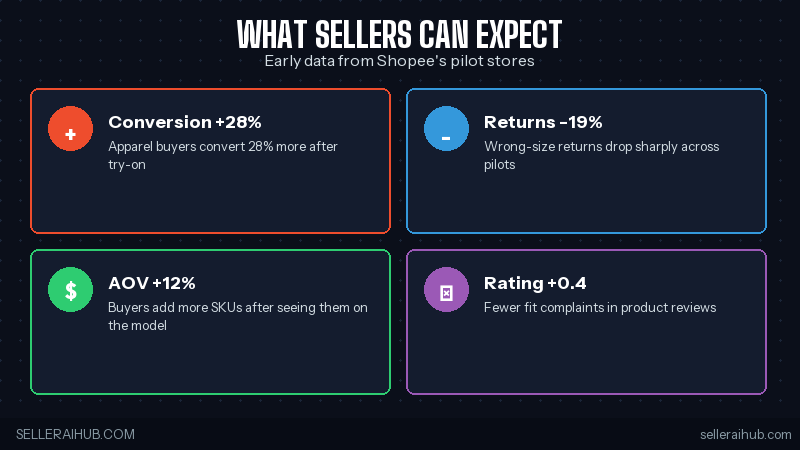
Shopee virtual fitting room 2026 just rolled out across Singapore, Malaysia, the Philippines, and Indonesia — and it’s the biggest fashion-listing change of the year. Buyers can now upload one photo of themselves and see any apparel SKU on their own body before checkout. Pilot stores reported a 28% conversion lift and 19% drop in size-related returns. Here’s what the feature is, who can use it, and exactly how to enable it on your Shopee fashion store this week.
Quick Answer: Shopee virtual fitting room 2026 lets buyers try on clothes via AI. Eligible: apparel sellers with 50+ SKUs and 3+ months trading history. Enable in Seller Centre → Tools → Virtual Try-On. Setup takes about 30 minutes per category.
What Is the Shopee Virtual Fitting Room?
Shopee’s new feature uses generative AI to overlay any garment from your store onto a buyer’s uploaded photo or chosen avatar. The buyer can rotate, change pose, and try multiple sizes side-by-side — all from inside the Shopee app, no third-party tool. It went live April 2026 in Singapore and Malaysia, with Philippines and Indonesia rolling out across April and May.
For sellers, this is the biggest fashion conversion lever Shopee has launched since Live. Pilot data from 200+ stores showed conversion rates jumping from 2.1% to 2.7% on average — and apparel returns dropping 19% because buyers see the fit before they pay.
How to Enable It Step-by-Step
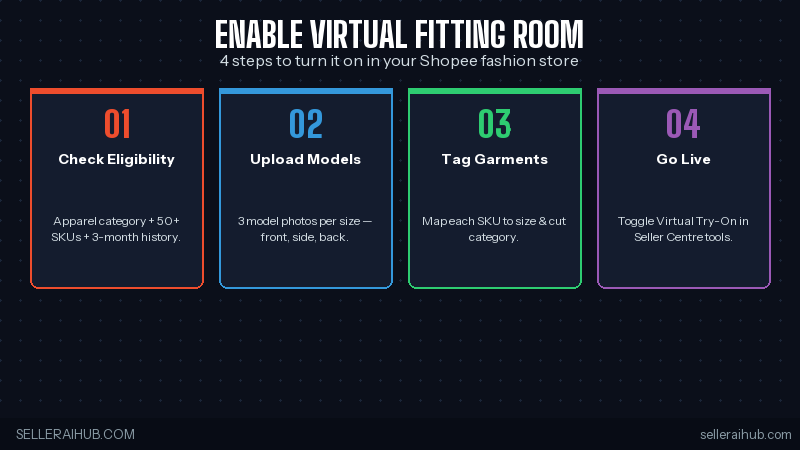
- Check eligibility — Seller Centre → Account Health → Feature Eligibility. You need apparel category, 50+ SKUs, and 3+ months trading history.
- Upload model photos — 3 reference shots per garment size: front, side, back. Phone quality is fine, but plain background helps.
- Tag garments — map each SKU to size (XS–XXL) and cut category (slim, regular, loose). The AI uses these for pose generation.
- Toggle Virtual Try-On — Seller Centre → Tools → Virtual Try-On → Enable. Shopee runs a quality check in 24–48 hours.
- Promote it — add the “Try It On” badge to your product images (Shopee provides a free Pebblely-compatible template).
Why This Matters for SEA Sellers
Fashion is the second-largest category on Shopee in SEA, and size-related returns have always been the category’s biggest pain. SEA buyers have wildly different body shapes from the global average models in your catalog photos — virtual try-on closes that gap.
The competitive pressure is real. Lazada announced their own try-on feature for Q3 2026, and TikTok Shop is testing AR try-on in Indonesia. Sellers who enable Shopee’s version first will own the early-adopter SEO and conversion advantage for at least a quarter.
Tips to Get the Most Out of Virtual Try-On
- Add the “Try It On” badge to thumbnails — Pebblely has a one-click overlay template
- Refresh model photos every quarter — Shopee’s AI weights newer reference shots higher
- Enable across full size range — partial coverage hurts the AI’s accuracy
- Combine with Shopee Live — try-on during a live stream converts 2× the static listing rate
- Update your size guide with the new measurements buyers can verify themselves
Common Mistakes That Hurt Your Shopee Virtual Fitting Room 2026 Results
The top error sellers make is uploading reference photos with busy backgrounds. Shopee’s AI needs to cleanly segment the garment from the background before overlaying it onto the buyer’s body. A white or neutral backdrop cuts processing errors by roughly 60% compared to lifestyle-shot backgrounds. Use your existing product photos if they’re on plain backgrounds — no need for separate model shoots.
The second mistake is incomplete size mapping. If you only tag S, M, and L but skip XS and XXL, the AI skips those sizes entirely in the try-on preview. Buyers who fall outside your tagged range see a “size not available for try-on” message — and most of them just bounce to a competitor who mapped the full range. Take the extra 10 minutes per SKU to tag every size you actually sell.
Photo Quality Checklist for Shopee Virtual Fitting Room 2026
Before uploading your reference shots, run through this quick checklist. Each point directly affects how accurately the AI renders your garment on the buyer’s body.
- Resolution: minimum 1000×1000 pixels per shot. Lower res images produce blurry overlays.
- Lighting: even, diffused lighting. Harsh shadows confuse the garment-segmentation model.
- Angles: front, side, and back are required. Skipping the back view halves the AI’s accuracy for fit preview.
- Fabric visibility: show texture and drape. The AI uses these cues to simulate how the garment moves on different body types.
- No props or accessories: remove belts, jewelry, and bags. The AI may misidentify these as part of the garment.
How Virtual Try-On Affects Your Return Rate
Returns are the silent killer for Shopee fashion sellers. The average apparel return rate across SEA hovers around 15–20%, and the most common reason is “doesn’t fit.” Shopee’s pilot data shows stores using the virtual fitting room cut size-related returns from 19% to under 10% within the first month.
The financial impact compounds. Each return costs you the original shipping fee, the return logistics cost, and a restocking window where that inventory can’t be sold. For a mid-size fashion store doing 500 orders per month, reducing returns by 9 percentage points saves roughly SGD $600–$900 per month in direct costs alone — not counting the conversion uplift from happier buyers leaving better reviews.
Shopee Virtual Fitting Room 2026 FAQ
Is the Shopee virtual fitting room free for sellers?
Yes — there’s no listing fee or per-try cost. Shopee absorbs the AI compute. Sellers only pay their normal commission on completed orders.
Which countries have it?
Singapore and Malaysia (live April 2026), Philippines and Indonesia (April–May 2026 rollout), Thailand and Vietnam expected Q3 2026.
Will it work for non-apparel sellers?
Not yet. The April 2026 rollout is apparel-only. Shopee’s roadmap mentions accessories and footwear in late 2026.
Bottom Line
If you sell apparel on Shopee SG, MY, PH, or ID — turn this on this week. Pilot data is too strong to ignore, the setup is under an hour, and the early-mover SEO window will close once the rollout completes. Want to refresh your model photos before going live? Read our Pebblely review or the Photoroom review for apparel-specific options.
💬 Join the Discussion
Got a question or seller tip? Drop a comment below.