
Quick Answer: Flair AI is a drag-and-drop product photo staging tool that places your product into AI-generated lifestyle scenes. This Flair AI review for ecommerce sellers rates it 4 out of 5 — it’s genuinely easy to use, the free plan is usable for Shopee sellers, and it transforms plain product shots into store-quality gallery images in minutes. Best for fashion, home goods, and beauty sellers on Shopee, Lazada, and TikTok Shop.
Your Shopee cover photo gets your listing clicked. But it’s your gallery photos — slots 2 through 9 — that close the sale. That’s where buyers check if the product looks good in a real setting, how it fits, how it’s used. Most sellers skip this because professional lifestyle photography is expensive and time-consuming to arrange. Flair AI is built specifically to solve that problem.
This Flair AI review for ecommerce sellers covers what Flair.ai does, how it fits into a Shopee and TikTok Shop seller’s workflow, what the free plan actually includes, and who should (and shouldn’t) pay for the Pro version. Let’s get into it.
What Is Flair AI?
Flair AI (flair.ai) is an AI product photo staging tool designed for ecommerce brands. You upload a product photo with the background removed, then drag it onto a virtual scene — a café table, a bedroom shelf, a studio setup — and Flair AI generates a photorealistic image of your product sitting in that environment.
Unlike background removers like Photoroom or Pokecut, Flair AI’s main job is scene composition. You’re not just cleaning up a background — you’re creating a complete lifestyle image that could pass for a professional photoshoot.
Platforms supported: Works for any marketplace. Particularly useful for Shopee, Lazada, and TikTok Shop gallery photos across SEA markets including SG, MY, PH, TH, and ID.
Flair AI Review: How It Works for Ecommerce Sellers
The workflow is designed to be straightforward even if you have no design experience:
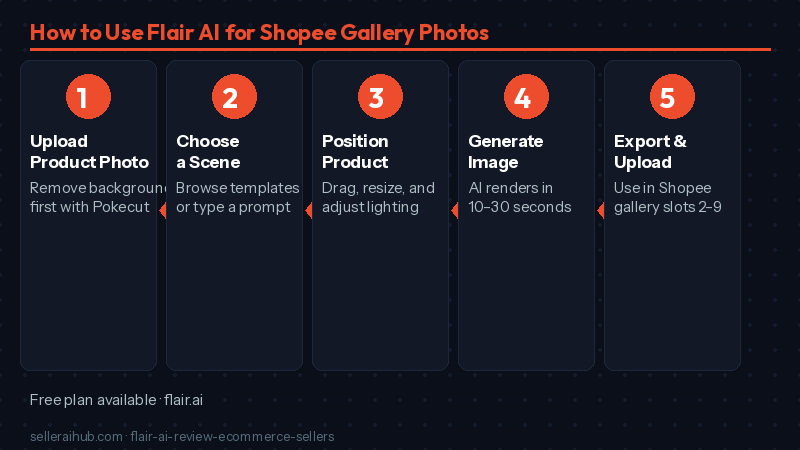
- Upload your product image. Ideally a photo with the background already removed (Pokecut or Photoroom handle this step). Flair AI can also auto-remove backgrounds in-app.
- Choose or describe a scene. Browse Flair’s template library of pre-built scenes (café, marble surface, outdoor table, bedroom), or type a text prompt to generate a custom backdrop.
- Drag and position your product. Place it in the scene, resize it, rotate it, and adjust the lighting to match the background.
- Generate. Flair AI renders the final image with your product composited into the scene. This takes 10–30 seconds.
- Export and upload to Shopee. Download and use in your gallery slots 2–9 to show your product in context.
Key Features Worth Knowing
Drag-and-Drop Scene Editor
The core interface works like a simple design canvas. You place your product, add props from Flair’s library (plants, fabrics, bottles, bowls), and adjust positioning. There’s no complicated software to learn — if you’ve used Canva, this will feel familiar within the first five minutes.
Text-to-Scene Generation
This is Flair AI’s standout feature for ecommerce sellers. Instead of choosing from a preset backdrop library, you describe the scene you want: “wooden café table with plants, morning light” or “minimalist white marble surface with Raya decoration.” Flair generates the background to match. Useful for seasonal campaigns like Hariraya, CNY, or 11.11.
Brand Kit (Pro)
On the Pro plan, you can save your brand colors, logo, and preferred scene styles. Flair AI will apply them consistently across all your product stagings. Helpful if you run a cohesive storefront across Shopee, Lazada, and TikTok Shop and want all your gallery images to feel like one visual brand.
Multiple Export Sizes
Export your staging in different dimensions for different platforms: square 1:1 for Shopee cover, portrait 3:4 for Shopee fashion, landscape 16:9 for TikTok Shop banners. You set the output size before exporting, so one staged image can cover multiple platforms without re-editing.
Flair AI Pricing — Free vs Pro for SEA Sellers
Flair AI has a genuinely useful free plan — unlike many tools where the free tier is just a long trial that quickly hits a wall.
| Plan | Price | What you get | Best for |
|---|---|---|---|
| Free | $0/month | Limited generations per month, access to scene templates, basic export | Sellers with a small catalog who want to try AI staging on a few hero products |
| Pro | ~USD $10/month (≈ SGD 13.50 / MYR 46.50 / PHP 580) | More generation credits, Brand Kit, priority generation, higher-resolution exports | Active stores on Shopee or Lazada who update gallery photos regularly |
| Enterprise | Custom pricing | API access, bulk processing, dedicated support | Agencies or brands managing multiple storefronts across platforms |
Note: Flair AI’s credit limits on the free plan do change periodically. Check flair.ai for current limits before building your workflow around the free tier.
What We Like
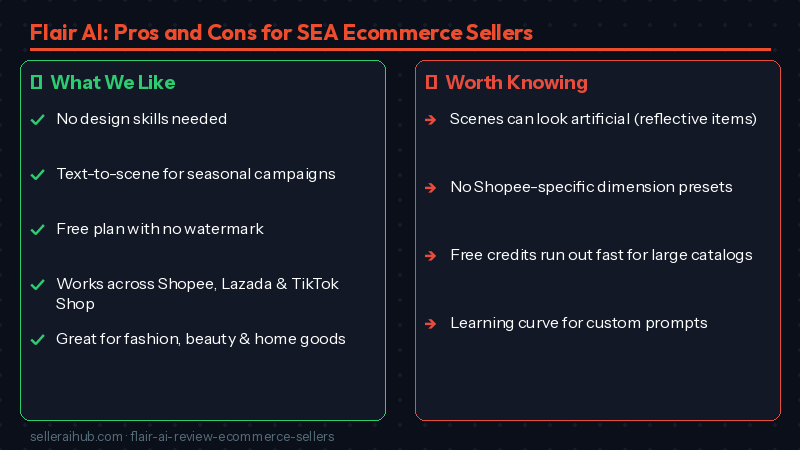
- No design skills needed. The drag-and-drop interface is genuinely beginner-friendly. You don’t need to understand layers, masks, or lighting theory to produce a decent lifestyle image.
- Text-to-scene is powerful for seasonal campaigns. Generating a festive Hariraya or CNY backdrop on demand — without sourcing physical props or hiring a stylist — is a real cost saving for Shopee sellers running seasonal promotions.
- The free plan is actually usable. Unlike Photoroom’s free tier (watermarked exports), Flair’s free plan produces clean exports within its credit limit. A small Shopee store can genuinely use this at $0.
- Works alongside other tools. Flair AI is not trying to replace your background remover. It’s designed to come after: you remove the background with Pokecut or Photoroom, then stage the cutout in Flair. The tools complement each other.
- Seasonal and themed scenes on demand. Generating “Shopee 9.9 Sale”-themed product shots without a studio is a competitive advantage during high-traffic campaigns.
What Could Be Better
- Generated scenes don’t always look realistic. For some product types — reflective surfaces, glassware, transparent packaging — the AI compositing doesn’t blend perfectly. The product can look pasted in rather than placed. Results vary significantly by product category.
- No Shopee-specific presets. Unlike Photoroom, Flair AI doesn’t have a one-click Shopee template. You need to manually set your export dimensions to match Shopee’s requirements (600×600px minimum for cover, 900×900px for gallery).
- Free plan credits run out fast if you have a large catalog. Once you hit the monthly limit, you’re either waiting for the reset or upgrading. Sellers with 50+ active SKUs will feel this constraint quickly.
- Learning curve for custom prompting. The text-to-scene generation works well once you learn to write good prompts, but it takes a few attempts to figure out which descriptions produce useful backdrops and which produce abstract noise.
Who Should Use Flair AI?
| Flair AI is a good fit if you… | Consider other tools if you… |
|---|---|
| Sell lifestyle products — fashion, home décor, beauty, food, accessories | Sell technical products where lifestyle staging doesn’t add value (electronics components, industrial items) |
| Want professional-looking gallery photos without a photoshoot | Already have a photographer producing gallery images |
| Run seasonal promotions and want themed product images | Need to process hundreds of images in one batch (Claid.ai or Photoroom Max are better for volume) |
| Manage a store on both Shopee and TikTok Shop and want gallery images for both | Need tight control over realistic shadows and reflections for high-end product photography |
Frequently Asked Questions About Flair AI
Is Flair AI free for Shopee sellers?
Yes — Flair AI has a free plan with a monthly generation limit. Exports on the free plan do not include a watermark, making it usable for actual Shopee listings within the credit allowance. Once you exceed the monthly limit, you’ll need to wait for the reset or upgrade to Pro.
Can I use Flair AI for TikTok Shop product images?
Yes. Flair AI works for any marketplace. You choose your export dimensions when saving, so you can export the same staged image in TikTok Shop’s preferred landscape ratio and Shopee’s square or portrait format from the same editing session.
Do I need to remove the background before using Flair AI?
Flair AI can auto-remove backgrounds in-app, but results are better if you start with a clean cutout from a dedicated tool like Pokecut (free) or Photoroom. If your product has complex edges — fur, hair, transparent packaging — remove the background separately first, then import the cutout into Flair.
Will Shopee or Lazada reject AI-staged product photos?
No. Neither Shopee nor Lazada restricts AI-generated or AI-staged product imagery. The requirement is that photos must accurately represent the product. As long as the staging doesn’t mislead buyers about the product’s appearance, size, or condition, AI-staged images are fully acceptable.
What’s the difference between Flair AI and Photoroom?
Photoroom specialises in background removal, cleanup, and marketplace-specific presets. Flair AI specialises in scene staging — placing your product into lifestyle environments. Many sellers use both: Photoroom for cover photos and Pokecut for quick removals, then Flair AI for gallery lifestyle shots. They’re complementary, not competing.
Flair AI Verdict: Our Final Rating
Our Flair AI review for ecommerce sellers gives it 4 out of 5.
For Shopee and TikTok Shop sellers in SEA, Flair AI solves a real problem: how do you get professional gallery images without a photoshoot? The drag-and-drop interface is easy enough for any seller to pick up, the text-to-scene generation is genuinely useful for seasonal campaigns, and the free plan is actually usable — not just a watermarked teaser.
The limitations are real: AI compositing doesn’t always look convincing on reflective or transparent products, and Flair AI doesn’t have Shopee-specific presets like Photoroom does. But for sellers in fashion, home goods, beauty, and food categories, the trade-off is worth it.
Start with the free plan and use it on 3–5 of your gallery slots. If the output quality works for your product type, the Pro plan at approximately SGD 13.50/month is reasonable for what you get.
Related guides: Check our full AI product photo tool comparison to see how Flair AI stacks up against Photoroom, Pokecut, and Claid.ai. Or read our guide on writing Shopee product descriptions with AI to complete your listing workflow.