
Quick Answer: The best AI product photo tool for Shopee in 2026 is Photoroom — it handles background removal, AI scene generation, batch processing, and resizing to Shopee’s 1:1 ratio in one app, starting free. For a free Shopee-optimized option, Pokecut is the strongest alternative. Shopee’s own built-in AI photo tool is improving but still limited compared to dedicated options.
Product photos are the single biggest factor in whether a buyer clicks on your Shopee listing or scrolls past it. According to Shopee’s own data, 45% of purchasing decisions are influenced by product images. But hiring a photographer or renting a studio isn’t practical when you’re managing 50–200 SKUs. That’s where an AI product photo tool for Shopee comes in.
We tested five AI photo tools against Shopee’s specific image requirements — 1:1 ratio, white backgrounds, minimum 600×600px for covers, and 900×900px for gallery images. Here’s which ones actually work for SEA sellers.
Table of Contents
- What Shopee requires for product images
- Quick verdict — which tool should you pick?
- Side-by-side comparison table
- Photoroom — best overall
- Pokecut — best free Shopee-optimized tool
- Shopee AI Photos — best built-in option
- Claid.ai — best for batch processing
- Flair.ai — best for lifestyle scenes
- Frequently asked questions
- Our final pick
What Shopee Requires for Product Images
Before choosing any AI product photo tool for Shopee, you need to know the platform’s image standards. Any tool you pick must output images that meet these specs:
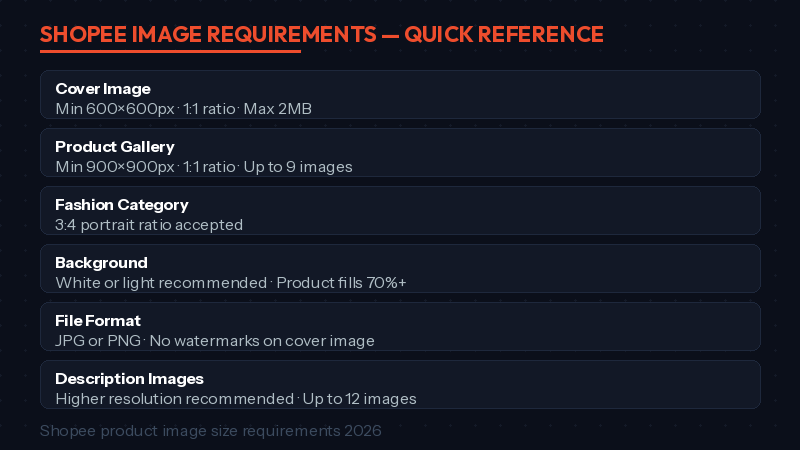
| Image Type | Min Size | Ratio | Notes |
|---|---|---|---|
| Cover image | 600×600px | 1:1 | Max 2MB, no watermarks, product fills 70%+ of frame |
| Gallery images | 900×900px | 1:1 | Up to 9 images per listing |
| Fashion category | 900×1200px | 3:4 | Portrait ratio accepted for clothing |
| Description images | 900×900px+ | Flexible | Up to 12 images, higher resolution recommended |
Key takeaway: White or light backgrounds are recommended (not strictly required). The product should fill at least 70% of the frame. These requirements matter because any AI tool that can’t output clean 1:1 square images on white backgrounds is useless for Shopee listings.
Quick Verdict — Which AI Product Photo Tool for Shopee Should You Pick?
Photoroom is the best overall pick for most Shopee sellers. It combines background removal, AI scene generation, batch processing, and marketplace-specific resizing in one tool — starting free. If you want a free alternative that’s explicitly built for Shopee (with batch editing and marketplace compliance), Pokecut is the strongest option. And if you’re a new seller with minimal budget, Shopee’s built-in AI photo tool handles basic enhancements at no cost.
AI Product Photo Tools for Shopee — Side-by-Side Comparison
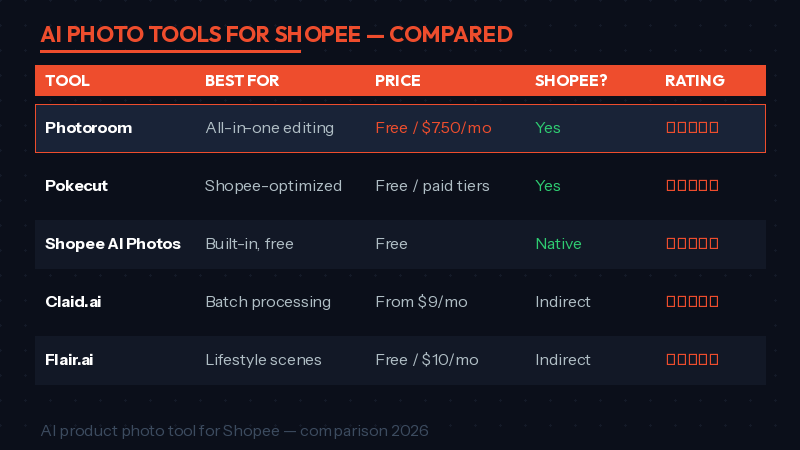
| Tool | Best For | Price | Shopee Support | Key Strength |
|---|---|---|---|---|
| Photoroom | All-in-one editing | Free / $7.50/mo | Yes (resize presets) | Background removal + AI scenes + batch |
| Pokecut | Shopee-optimized cleanup | Free / paid tiers | Yes (Shopee format) | Removes dust, reflections, resizes for Shopee |
| Shopee AI Photos | Built-in, free | Free | Native | Integrated into Seller Centre |
| Claid.ai | High-volume batch | From $9/mo | Indirect (API) | 80% editing cost reduction, HDR filter |
| Flair.ai | Lifestyle scenes | Free / $10/mo | Indirect | Drag-and-drop AI scene staging |
Photoroom — Best Overall AI Product Photo Tool for Shopee
What it does
Photoroom is an all-in-one AI photo editor built specifically for e-commerce sellers. It handles background removal, AI background generation, product beautification (lighting, shadows, texture correction), batch processing, and automatic resizing for marketplace specs. It works on both mobile and desktop.
Why it works for Shopee
Photoroom includes marketplace-specific presets, so you can output images in Shopee’s 1:1 square ratio with a clean white background in one click. The AI Shadow feature adds realistic depth that makes product-on-white images look professional rather than flat. Sellers using Photoroom have reported 72% higher click-through rates on their listings.
Pricing
Free plan with watermark. Pro starts at $7.50/month (billed annually). Enterprise pricing available for large catalogs.
Pokecut — Best Free Shopee-Optimized Photo Tool
What it does
Pokecut is an AI photo editor that focuses on product image cleanup — removing dust, reflections, watermarks, display stands, and background clutter. It also handles background removal, lighting correction, and batch editing for up to 50 photos at once.
Why it works for Shopee
Pokecut explicitly supports Shopee and Amazon format standards. It can resize and clean images to meet Shopee’s 1:1 ratio and white background requirements. Sellers on Shopee report measurable improvements in click-through rates after switching from phone photos to Pokecut-edited images. The batch processing is particularly useful for sellers managing large inventories.
Pricing
Free tier available with core features. Paid plans for advanced editing and higher batch limits.
Shopee AI Photos — Best Built-In Option
What it does
Shopee launched AI-generated product photo features directly inside Seller Centre in 2025, with continued improvements in 2026. The tool generates optimized product photos and includes an auto-reader that suggests category attributes from your images. Shopee also announced a virtual fitting room for fashion sellers at the February 2026 Brands Summit.
Why it works for Shopee
It’s free, native, and requires zero setup — the images it generates already meet Shopee’s format requirements. However, it’s more limited than dedicated tools: no batch processing, no AI scene generation, and fewer editing controls. Best for quick enhancements to existing photos, not for building a full catalog from scratch.
Pricing
Completely free for all Shopee sellers.
Claid.ai — Best for High-Volume Batch Processing
What it does
Claid.ai is trained specifically for product photography. It handles background removal, AI-powered HDR filtering (auto white balance, exposure, color correction), and batch processing via API. Businesses report an 80% drop in editing costs and 5x faster seller onboarding.
Why it works for Shopee
Claid.ai’s product-specific AI produces cleaner edges on tricky items (transparent bottles, fine jewelry, textured fabrics) than general-purpose tools. The API integration is ideal for sellers with 500+ SKUs who need automated photo pipelines. It doesn’t have Shopee-specific presets, but you can configure output dimensions to match Shopee’s requirements.
Pricing
Starts at $9/month. API pricing scales with volume.
Flair.ai — Best for AI Lifestyle Scenes
What it does
Flair.ai is a virtual design studio that places your products in AI-generated lifestyle environments using a drag-and-drop canvas. Upload a product photo, choose from 3D props and digital backdrops, and generate scenes like “coffee mug on a marble countertop” or “skincare serum emerging from water.”
Why it works for Shopee
Shopee allows lifestyle images in your gallery slots (images 2–9). Flair.ai helps you create these without a photoshoot. It’s especially valuable for beauty, home, and fashion categories where lifestyle context drives conversions. Use it alongside a background removal tool — Flair.ai for lifestyle shots, Photoroom or Pokecut for clean white-background covers.
Pricing
Free tier with limited generations. Pro starts at $10/month.
Frequently Asked Questions
What is the best free AI product photo tool for Shopee?
Pokecut offers the best free experience for Shopee sellers specifically — it supports Shopee format standards, handles batch editing, and removes common product photo issues like dust and reflections. Shopee’s built-in AI photo tool is also free but more limited in features.
Will Shopee reject AI-generated product photos?
No. Shopee does not reject images for being AI-generated. What matters is that images are high-resolution, accurately represent the product, use a clean background for the cover image, and don’t include misleading text overlays or watermarks. AI tools help you meet these standards more consistently.
What size should Shopee product images be?
Cover images: minimum 600×600px (1024×1024px recommended for zoom). Gallery images: minimum 900×900px. Always use a 1:1 square aspect ratio except for fashion (3:4 accepted). Maximum file size is 2MB per image.
Can I use AI to remove backgrounds from Shopee product photos?
Yes — this is the most common use case. Tools like Photoroom and Pokecut remove backgrounds in seconds and replace them with clean white or custom AI-generated scenes. This is faster and cheaper than studio photography for most product categories.
Our Final Pick: Best AI Product Photo Tool for Shopee
For most Shopee sellers, Photoroom is the best all-around choice. It handles every step of the product photo workflow — background removal, AI scenes, lighting correction, batch processing, and marketplace-specific resizing — in one tool. The free plan gets you started, and Pro at $7.50/month is excellent value for serious sellers.
If you’re on a tight budget, Pokecut is the best free AI product photo tool for Shopee — it explicitly supports Shopee’s format standards and handles the product cleanup most sellers need. And if you want lifestyle scenes for gallery images, add Flair.ai to your toolkit alongside your primary background removal tool.
Next steps: Great photos need great descriptions to convert. Check our guide to writing Shopee product descriptions with AI, or learn how to rank higher on Shopee search to make sure your optimized images actually get seen.