

Shopdora Chrome Extension is the fastest way to bring Shopee data into your normal browsing workflow. Instead of copying products into a dashboard, you install the extension, open Shopee, and read sales, price and keyword clues in context.
Quick Answer: Shopdora Chrome Extension helps Shopee sellers read product data, keyword demand and competitor signals while browsing. Use it for shortlist research, then verify the final product in Shopdora web dashboards before ordering stock.
Shopdora Chrome Extension: Quick Plan
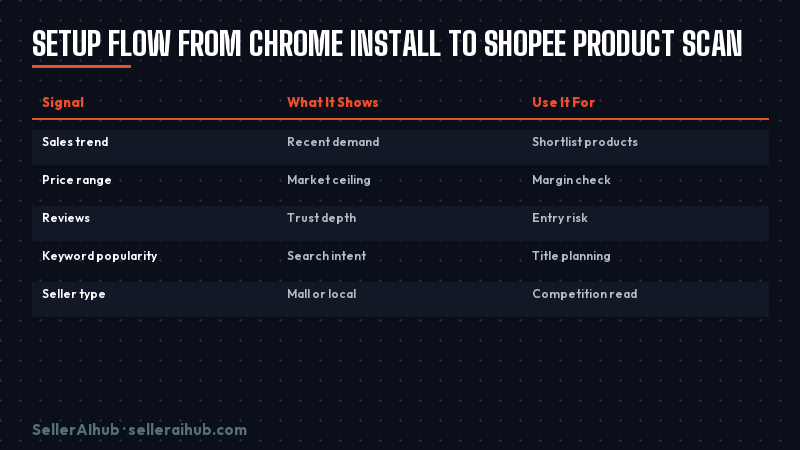
Shopdora Chrome Extension works best as a first-pass research layer. Install it from the Chrome Web Store, browse Shopee product and search pages, record products with strong demand, and then compare price, reviews, seller type and keyword fit before sourcing.
| Signal | What It Shows | Use It For |
|---|---|---|
| Sales trend | Recent demand | Shortlist products |
| Price range | Market ceiling | Margin check |
| Reviews | Trust depth | Entry risk |
| Keyword popularity | Search intent | Title planning |
| Seller type | Mall or local | Competition read |
What Changed in 2026
This topic matters now because the useful search intent is narrow. Sellers want the exact setting, tool or rule that affects daily work, not another broad AI trend article. That is why this guide keeps the advice tied to SEA marketplace execution.
How to Use Shopdora Chrome Extension
Use this workflow when you are preparing a new SKU, refreshing a weak listing, or planning a campaign calendar. Keep the test small first. Then scale only after the data proves the move.
- Install extension
- Open Shopee search
- Scan top 20 products
- Save winners
- Validate in dashboard
Practical Workflow
Start with one market and one product group. Singapore, Malaysia, Philippines, Thailand and Indonesia behave differently, so a tactic that works in MYR may not transfer cleanly to PHP or IDR. Record the baseline before you change anything.
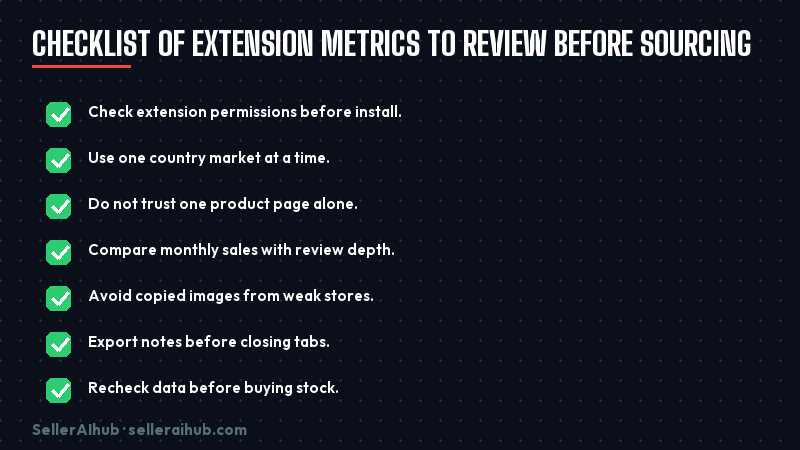
- Check extension permissions before install.
- Use one country market at a time.
- Do not trust one product page alone.
- Compare monthly sales with review depth.
- Avoid copied images from weak stores.
- Export notes before closing tabs.
- Recheck data before buying stock.
Common Mistakes to Avoid
- Reading one metric in isolation.
- Leaving the wrong Shopee market selected.
- Assuming extension data replaces supplier due diligence.
Useful References
For source checks, start with Shopdora Chrome Web Store listing. Shopdora analytics tools guide. For next steps on SellerAIhub, read Shopdora review. Shopdora beginner tutorial. Shopdora vs SplitDragon comparison.
Frequently Asked Questions
Is Shopdora Chrome Extension free?
The Chrome Web Store listing is free to install. Some deeper Shopdora analytics features may still require a paid Shopdora account.
How do I use Shopdora Chrome Extension for Shopee?
Install it, open Shopee search or product pages, and record sales, price, review and keyword signals for products you want to compare.
Is the extension safe for my Shopee account?
Review the Chrome Web Store permissions first. Use it for public product research, not for changing store settings.
Does Shopdora work outside Indonesia?
Yes. Shopdora supports multiple Shopee markets, including Singapore, Malaysia, Philippines, Thailand, Vietnam and Indonesia.
💬 Join the Discussion
Got a question or seller tip? Drop a comment below.