
Quick Answer: Photoroom is an AI photo editor built for ecommerce sellers. Our Photoroom review for Shopee sellers gives it 4.5 out of 5 — it removes backgrounds in one tap, ships marketplace-ready presets for Shopee’s 1:1 and 3:4 ratios, and lets you batch-edit up to 250 photos at once. The Pro plan costs around SGD 10/month (billed yearly). If you list 10 or more products a month, it pays for itself fast.
Your product photo is the first thing a Shopee buyer sees. Before they read your title, check your rating, or look at your price — they see your photo. If it looks amateurish, they scroll past. That’s why this Photoroom review for Shopee sellers matters: the right photo tool can directly lift your click-through rate, and Photoroom is one of the most-used options in SEA right now.
This review covers what Photoroom actually does, how it fits into a Shopee seller’s workflow, what it costs in SGD, MYR, and PHP, and whether it’s worth the money compared to free alternatives. Let’s get into it.
What Is Photoroom?
Photoroom is an AI-powered photo editing app designed for ecommerce sellers, small businesses, and solo creators who need professional-looking product images without a studio setup. You upload a photo, and the AI removes the background, cleans up the subject, and lets you swap in a new backdrop — all in seconds.
It runs on iOS, Android, and web browser, which means you can edit on your phone right after taking a product shot — no desktop required. Over 300 million downloads globally, with a strong user base across Southeast Asia.
Who it’s for: Shopee and Lazada sellers who photograph their own products and need clean, marketplace-ready images without hiring a photographer or learning Photoshop.
Photoroom Review for Shopee Sellers: Key Features
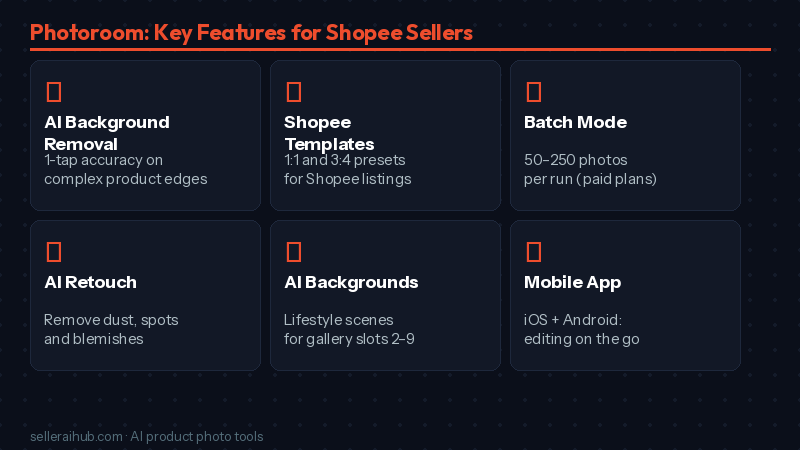
Here’s what actually matters for a Shopee seller’s workflow:
AI Background Removal
One tap removes the background. It handles complex edges — hair, transparent packaging, thin straps — better than most free tools. The result is a clean cutout you can place on any background. For Shopee’s white-background cover photo requirement, this is the core feature you’re paying for.
Marketplace-Ready Templates
Photoroom includes preset templates sized exactly for Shopee’s image requirements: 1:1 square for cover photos, 3:4 portrait for fashion categories. You select the template, and your product snaps into place at the right dimensions with the right background. No guessing at pixel sizes, no cropping mistakes.
Batch Mode
This is the time-saver most Shopee sellers don’t know about. Instead of editing photos one by one, you upload a folder and apply the same background removal and template to every image in one run. The Pro plan handles 50 images at a time; the Max plan bumps that to 250. If you’re updating listings before 9.9 or 11.11 campaigns, this feature alone justifies the subscription.
AI Retouch and Magic Eraser
Zoom in on your product and you’ll often find small problems — a speck of dust, a price sticker, a reflection. The Retouch tool lets you paint over those spots and the AI fills them in seamlessly. Useful for cleaning up fabric shots, beauty products, and anything with a glossy surface.
AI Backgrounds and Lifestyle Staging
Once your background is removed, you can swap in an AI-generated backdrop — a clean white studio, a cafe table, a bedroom shelf. This is especially useful for your gallery slots 2 to 9 on Shopee, where you can tell a lifestyle story without an actual photoshoot. On the Pro plan, you get a set number of AI generation credits monthly.
Photoroom Pricing — What Shopee Sellers Actually Pay
Photoroom prices in USD. Here’s what that looks like in local currencies at current rates (billed annually for the cheapest per-month rate):
| Plan | USD/month | ≈ SGD/month | ≈ MYR/month | ≈ PHP/month | Best for |
|---|---|---|---|---|---|
| Free | $0 | — | — | — | Testing the tool. 250 exports/month with watermark — not suitable for live listings. |
| Pro (annual) | $7.50 | ~SGD 10 | ~MYR 35 | ~PHP 435 | Sellers listing up to 30 products/month. Includes Batch Mode (50 images), full background removal, marketplace templates. |
| Pro (monthly) | $12.99 | ~SGD 17.50 | ~MYR 60 | ~PHP 754 | Same features, pay monthly if you’re unsure about committing yearly. |
| Max (annual) | $20.83 | ~SGD 28 | ~MYR 97 | ~PHP 1,208 | Sellers listing 30–100 products/month. Batch Mode up to 250 images, more AI generation credits. |
Note: Prices shown are USD billed annually, converted at approximate March 2026 rates. Monthly billing costs more. Check photoroom.com/pricing for current rates in your region.
The free plan adds a watermark to every export, which means you can’t use it for Shopee listings. For real store use, you need at least the Pro annual plan.
What We Like
- Background removal is genuinely accurate. It handles product edges well, including fabric textures, accessories with thin straps, and bottles with transparent lids — areas where cheaper tools leave rough edges.
- Shopee-ready presets save time. You’re not resizing manually or guessing at ratios. Select the Shopee template and your image is instantly at the right dimensions.
- Batch Mode is a game-changer before sale campaigns. Updating 50 product photos before a 9.9 sale used to take a full afternoon. With Batch Mode it’s under an hour.
- Works on mobile. You can photograph a product, remove the background, and upload to Shopee Seller Centre — all from your phone, without switching apps.
- Sellers report a real CTR lift. Sellers using Photoroom have reported up to 72% higher click-through rates compared to raw, unedited product photos.
What Could Be Better
- Free plan is too limited for real use. The watermark makes free exports unusable for live listings. There’s no free tier that actually serves a seller with an active Shopee store.
- AI backgrounds can look artificial. The generated lifestyle backgrounds are good but not always convincing. For premium products — jewelry, skincare, electronics — real photoshoots still produce better gallery images.
- Pricing is in USD. There’s no SGD, MYR, or PHP billing option, so your bank may apply a currency conversion fee depending on your card.
- Customer support is slow. Multiple reviews flag that getting help via email takes longer than expected. The help center is comprehensive, but live chat is limited.
Photoroom vs Pokecut: Which Should You Use?
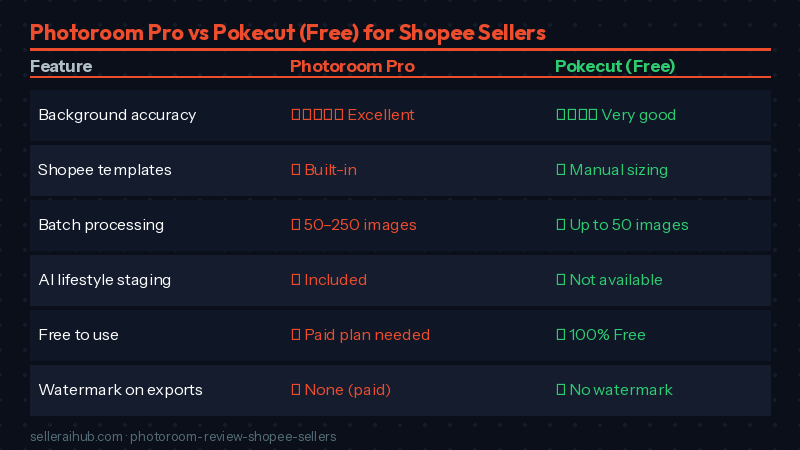
The most common alternative to Photoroom for Shopee sellers is Pokecut, which is entirely free. Here’s how they compare:
| Feature | Photoroom (Pro) | Pokecut (Free) |
|---|---|---|
| Background removal accuracy | ⭐⭐⭐⭐⭐ Excellent | ⭐⭐⭐⭐ Very good |
| Shopee-specific templates | ✅ Yes — built-in presets | ❌ Manual resizing required |
| Batch processing | ✅ 50–250 images/batch | ✅ Up to 50 images |
| Dust/reflection removal | ✅ AI Retouch | ✅ Dedicated Shopee cleanup |
| AI lifestyle backgrounds | ✅ Included | ❌ Not available |
| Mobile app | ✅ iOS + Android | ✅ iOS + Android |
| Watermark on exports | ✅ None on paid plans | ✅ None |
| Price | ~SGD 10/month (annual) | Free |
Bottom line: If you only need background removal and don’t use lifestyle staging or AI-generated scenes, Pokecut [LINK: Pokecut review] is a solid free option for Shopee sellers. If you want marketplace templates, Batch Mode beyond 50 images, and AI background generation built in, Photoroom is worth the SGD 10/month.
Who Should Use Photoroom?
| Photoroom is a good fit if you… | Consider alternatives if you… |
|---|---|
| Sell 10+ products per month on Shopee or Lazada | Only list a few products occasionally |
| Take your own product photos and need quick cleanup | Already work with a professional photographer |
| Want to update multiple listings before 9.9, 11.11, or Hariraya sales | Need API integration for bulk processing at scale (consider Claid.ai instead) |
| Run a fashion, lifestyle, or home goods store where staging matters | Sell products where photos rarely change (e.g. wholesale commodity items) |
| Manage your store from your phone | Need deep editing tools like Photoshop-level layer control |
Frequently Asked Questions About Photoroom for Shopee Sellers
Is Photoroom free for Shopee sellers?
Photoroom has a free plan, but it adds a watermark to every export. You cannot use watermarked images on Shopee listings. For real store use, you need the Pro plan (from approximately SGD 10/month billed annually). The free plan is fine for testing the tool before you commit.
Does Photoroom work with Shopee’s image size requirements?
Yes. Photoroom includes built-in templates for Shopee’s cover photo (1:1 square, minimum 600×600px) and fashion listings (3:4 portrait). You select the preset and your image is sized correctly. You don’t need to manually crop or resize after exporting.
Can I use Photoroom on a phone to edit Shopee photos?
Yes. Photoroom has iOS and Android apps. You can photograph your product, open Photoroom, remove the background, apply your chosen template, and export directly — all without a desktop. The mobile app covers all core features including Batch Mode on the Pro plan.
Will Shopee reject AI-edited product photos?
No. Shopee does not penalize or reject AI-edited product images. What matters is that your photos are accurate (no misleading edits), meet Shopee’s minimum size requirements, and are clean and professional. AI background removal and staging tools are widely used by Shopee sellers across SEA.
How does Photoroom compare to Shopee’s built-in AI photo tool?
Shopee’s built-in AI Photos (available in Seller Centre for some markets) does basic background removal and generates optimized cover photos for free. It’s convenient for quick edits to a single listing but has fewer features and less accuracy than Photoroom. For bulk editing or more polished results, Photoroom is the better option.
Photoroom Review Verdict: Is It Worth It for Shopee Sellers?
Our Photoroom review for Shopee sellers gives it 4.5 out of 5.
The background removal is accurate, the Shopee presets save real time, and the Batch Mode is the feature that makes the most difference day-to-day. At SGD 10/month on the annual plan, it costs less than a single ride-hail trip. If you’re listing 10 or more products a month and taking your own photos, the math is straightforward: one better product photo that lifts your CTR by even 10% will recover that cost from your first sale.
The free plan is genuinely not usable for live Shopee listings (watermarks), and the AI backgrounds aren’t perfect for premium products — those two caveats are why we stop short of 5 stars.
Start with the free trial to test background removal accuracy on your specific product type. If it handles your products well, upgrade to Pro annual and use Batch Mode before your next sale campaign.
Ready to compare more options? See our full AI product photo tool comparison for Shopee sellers or check out our guide on how to rank higher on Shopee search in 2026 once your photos are polished.
💬 Join the Discussion
Got a question or seller tip? Drop a comment below.