
Your Shopee listings are competing against thousands of other sellers in Singapore, Malaysia, the Philippines, and beyond. Standing out takes more than a decent photo and a keyword-packed title. That is where Shopee Product AI Optimiser comes in. Built right into Seller Centre, this free tool helps you pick better cover images, write sharper titles, and match what buyers actually search for. In this guide, you will learn exactly how to use it step by step so your products get more clicks and more sales in 2026.
Quick Answer: Shopee Product AI Optimiser is a free Seller Centre tool that recommends high-performing cover images, generates AI visuals for A/B testing, and suggests optimised titles, descriptions, and tags based on regional search trends. Access it from your product listing page under the AI tools section.
Why Shopee Product AI Optimiser Matters in 2026
Shopee has moved away from old-school keyword stuffing. The platform now uses Contextual Intent Matching (CIM), which means the algorithm cares about what buyers mean, not just what they type. Your listing needs to speak the same language as your target shopper.
The Product AI Optimiser analyses real-time search patterns across your market. It spots trends in Malaysia that differ from those in Thailand or Indonesia. That kind of localised intelligence is hard to replicate manually, especially if you sell across multiple SEA markets.
Cover images matter more than ever. Shopee’s algorithm rewards bright, high-contrast main images that stop the scroll. The AI Image Optimizer inside this tool recommends which of your photos is most likely to drive clicks. It can also generate fresh visuals so you can A/B test without hiring a designer.
If you are not using this tool yet, you are leaving free performance gains on the table. Most of your competitors have not caught on either, so early adopters get a real edge heading into 9.9 and 11.11 mega sales.
What You Need Before You Start
Before you dive into the Shopee Product AI Optimiser, make sure you have these basics covered.
- Active Shopee Seller account — registered in any supported SEA market (SG, MY, PH, TH, ID, VN)
- At least one published product listing — the tool works on existing listings, not drafts
- 3-5 product photos ready — the Image Optimizer needs options to compare
- Desktop access to Seller Centre — some AI features are not yet available on the Shopee app
- Basic product details filled in — category, price (SGD/MYR/PHP as applicable), and attributes
Once you have all of that sorted, you are ready to optimise. The whole process takes around 10-15 minutes per listing.
How to Use Shopee Product AI Optimiser Step by Step
Follow these steps to get your listings performing better with minimal effort.
Step 1: Open the Shopee Product AI Optimiser in Seller Centre
Log into Shopee Seller Centre and navigate to My Products. Select the listing you want to improve. Look for the AI tools section near the top of the product editing page. Click Product AI Optimiser to launch the dashboard.
If you do not see the option, check that your account is verified and your listing is already live. The tool rolls out in phases, so newer markets may get it slightly later.
Step 2: Run the Image Optimizer for Your Cover Photo
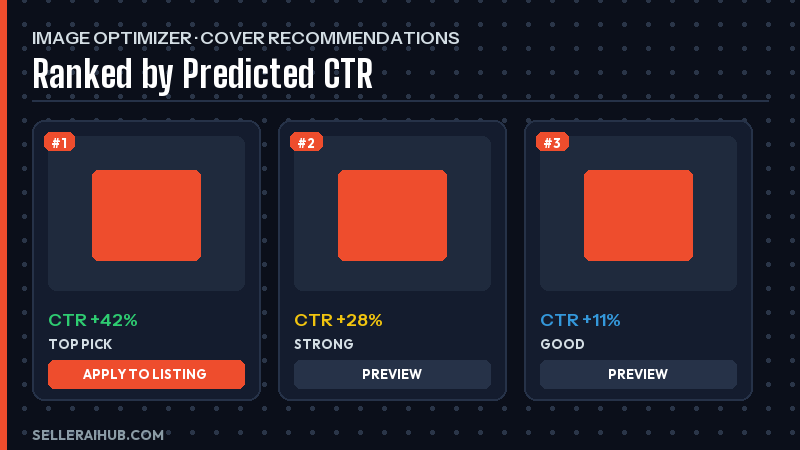
The Image Optimizer scans every photo on your listing. It scores each one based on brightness, contrast, composition, and historical click-through data from similar products in your category.
You will see a ranked list of your images with a recommended cover photo at the top. If none of your current photos score well, the AI can generate new product visuals automatically. These generated images are designed for high engagement and you can create multiple variants for A/B testing.
Pick the top-scoring image or generate a fresh one. Apply it as your main cover photo with one click.
Step 3: Optimise Your Product Title with AI Suggestions
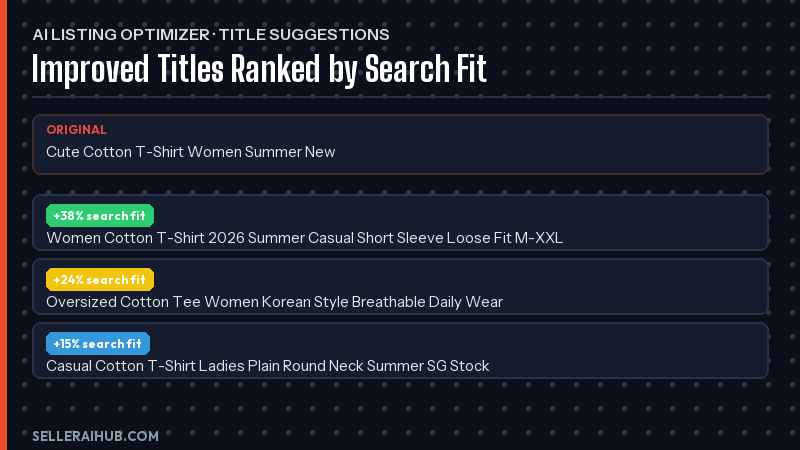
Next, switch to the AI Listing Optimizer tab. This feature analyses trending search terms in your specific market. It then suggests an improved product title that balances readability with discoverability.
The AI considers Contextual Intent Matching, so the suggested title focuses on buyer intent rather than cramming in every keyword. Review the suggestion, tweak it if needed, and apply. Keep your title under 120 characters for best results on mobile screens.
Step 4: Improve Your Description and Tags
The Listing Optimizer also generates description improvements and tag suggestions. Your description should highlight key benefits, sizing info, and any local certifications (like SG Safety Mark or SIRIM for Malaysia).
For tags, the AI pulls from real regional search data. Accept the suggestions that match your product. Remove any that feel off-target. You can add up to the platform limit, and each tag helps your listing appear in more relevant searches.
If you want more tips on writing titles that rank, check out our Shopee product title optimization guide.
Step 5: Review the Size and Fit Guide (If Applicable)
For fashion and apparel listings, the Optimiser can generate a size guide that matches your product’s measurements. This helps reduce returns and boosts buyer confidence. If your product does not need sizing, skip this step.
Fill in your measurements accurately. The AI formats them into a clean table that displays well on mobile.
Step 6: Save, Preview, and Monitor Results
After applying all optimisations, save your listing. Preview it on both desktop and mobile to make sure everything looks right. Then give it 7-14 days before judging results.
Track your click-through rate (CTR) and conversion rate in Seller Centre analytics. If your CTR improves but conversions stay flat, try testing a different cover image. The A/B testing feature makes this easy.
Tips to Get More from Shopee Product AI Optimiser
The tool does a lot of the heavy lifting, but a few smart habits will push your results further.
| Tip | Why It Works |
|---|---|
| Upload 5+ high-quality photos before running the Image Optimizer | More options give the AI better data to pick a winner |
| Re-run the Optimiser every 30 days | Search trends shift, especially around 9.9, 11.11, and 12.12 sales |
| A/B test at least 2 cover images per product | Even small CTR gains compound across hundreds of impressions |
| Combine AI suggestions with your own market knowledge | The AI spots patterns but you know your buyers best |
| Use AI-suggested tags alongside manual research | Covers both trending and niche long-tail keywords |
For a broader look at AI-powered seller tools, explore our roundup of the best AI tools for Shopee sellers in 2026.
Also remember that images are only one piece of the puzzle. If you want to rank higher on Shopee search, your reviews, response rate, and shipping speed all factor in alongside your listing quality.
Shopee Product AI Optimiser FAQ
Is Shopee Product AI Optimiser free to use?
Yes. The tool is completely free for all registered Shopee sellers. There is no premium tier or hidden cost. You access it directly through Seller Centre as part of the standard product editing workflow.
Which Shopee markets support the Product AI Optimiser?
It is available across major SEA markets including Singapore, Malaysia, the Philippines, Thailand, Indonesia, and Vietnam. Feature availability may vary slightly by region as Shopee rolls out updates on different schedules.
Can the AI-generated images replace professional product photography?
The AI-generated visuals are great for quick tests and boosting CTR. However, for hero shots and brand-building imagery, professional photography still has an edge. Many sellers use AI images for secondary slots and keep a professional main photo.
How often should I re-optimise my listings?
Run the Optimiser at least once a month. Before major campaigns like 9.9 or 11.11, re-run it to catch any shifts in buyer search behaviour. Trending keywords can change fast, so monthly checks keep your listings competitive.
Does the Shopee Product AI Optimiser work for all product categories?
It works across most categories. Image optimization and title suggestions are universal. The size and fit guide feature is specific to fashion and apparel. Some niche categories may have fewer data points, which can make AI suggestions less precise.
Conclusion
The Shopee Product AI Optimiser is one of the easiest wins available to SEA sellers right now. It costs nothing, lives inside the tools you already use, and takes about 15 minutes per listing. Better cover images, smarter titles, and trend-aware tags all add up to more visibility and more sales.
Start with your top-selling products. Run the Image Optimizer, apply the listing suggestions, and track your results over two weeks. Once you see the improvement, work through the rest of your catalogue. Your 2026 sales targets will thank you.
💬 Join the Discussion
Got a question or seller tip? Drop a comment below.