

This is a hands-on OpusClip review for TikTok Shop sellers in SEA — covering what the tool actually does well, where it falls short, and whether the price tag is justified for someone selling on TikTok Shop in Singapore, Malaysia, or the Philippines in 2026. I tested it on three product categories (beauty, gadgets, fashion) using long-form livestream replays as input.
Quick Answer: OpusClip is a solid time-saver for turning long videos into vertical clips, but it’s not a “set and forget” TikTok Shop tool. The AI clip selection works ~70% of the time, captions need editing, and the TikTok auto-scheduler is unreliable enough that most SEA sellers post manually. Worth it if you already record long-form content; skip it if you don’t.
What is OpusClip and what does it do for TikTok Shop sellers?
OpusClip is an AI video repurposing tool that takes long-form video — livestream recordings, product demos, review videos, podcasts — and automatically chops them into short vertical clips suitable for TikTok, Reels, and YouTube Shorts. For TikTok Shop sellers, the appeal is obvious: a 90-minute livestream replay can yield 8-15 short clips you can post throughout the week to keep the algorithm fed.
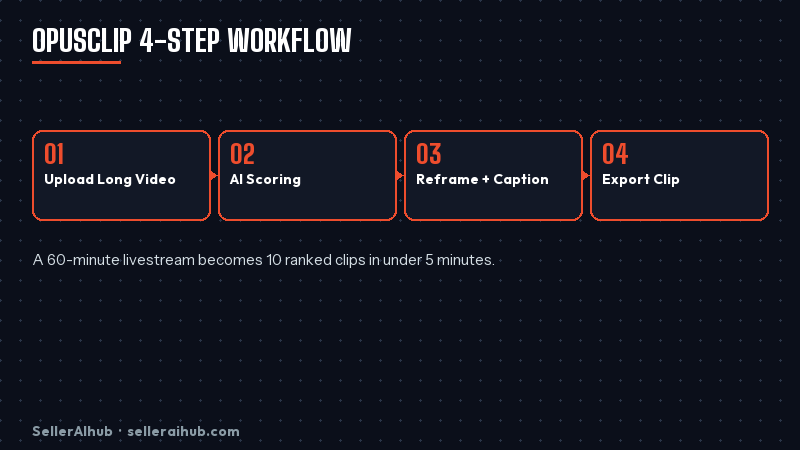
The workflow is simple. Upload a long video, the AI scores each segment for “virality,” auto-reframes it to 9:16, adds captions, and outputs ranked clips. You then trim, swap captions, add a hook, and export.
OpusClip review: pros for SEA TikTok Shop sellers
- Massive time saver: A 60-minute livestream becomes 10 ranked clips in under 5 minutes of processing. Manual editing the same content takes 3-4 hours.
- Auto-reframing is genuinely good: The AI tracks faces and product hands well. About 85% of clips look professional out of the box for talking-head or unboxing content.
- Hook detection works: The “ClipScore” rating catches strong moments most of the time — surprise reactions, demo wins, price reveals.
- Caption styling is on-brand for TikTok: Bold, animated, readable on small screens. Saves another 20 minutes per clip.
OpusClip review: where it falls short
For SEA TikTok Shop sellers specifically, four problems show up in actual use. None are dealbreakers, but you should know about them before paying.
1. Clip selection is inconsistent
Roughly 20-40% of “high-score” clips need to be discarded or recut. The AI sometimes picks moments that look good in isolation but lack context. You cannot trust the ClipScore alone — you still need to skim every output before posting.
2. Captions have errors, especially with mixed languages
If your livestream mixes English with Bahasa Malaysia, Tagalog, or Thai (very common in SEA streams), caption accuracy drops to around 60-70%. Manual cleanup in the editor is slow.
3. The TikTok scheduler is unreliable
This is the biggest issue for TikTok Shop sellers. OpusClip’s auto-post to TikTok drops connections frequently and posts fail silently. Most sellers download clips and upload to TikTok manually — which defeats half the productivity gain.
4. Pricing scales fast at the volume sellers need
The free tier (60 minutes/month) is too small for a serious seller. The Starter at US$9/month gets you 90 minutes — still tight. Pro at US$19 gives 300 minutes which is the realistic floor for a TikTok Shop seller posting 3-5 clips a day.
OpusClip pricing in 2026
| Plan | Price/mo | Upload | Best for |
|---|---|---|---|
| Free | $0 | 60 min | Trial only |
| Starter | $9 | 90 min | 1-2 clips/day testing |
| Pro | $19 | 300 min | Active TikTok Shop sellers |
| Pro+ | $29 | 600 min | Daily livestream sellers |
For most SEA TikTok Shop sellers running 2-3 livestreams a week, the Pro plan is the right tier. Pro+ is overkill unless you stream daily.
OpusClip review vs alternatives
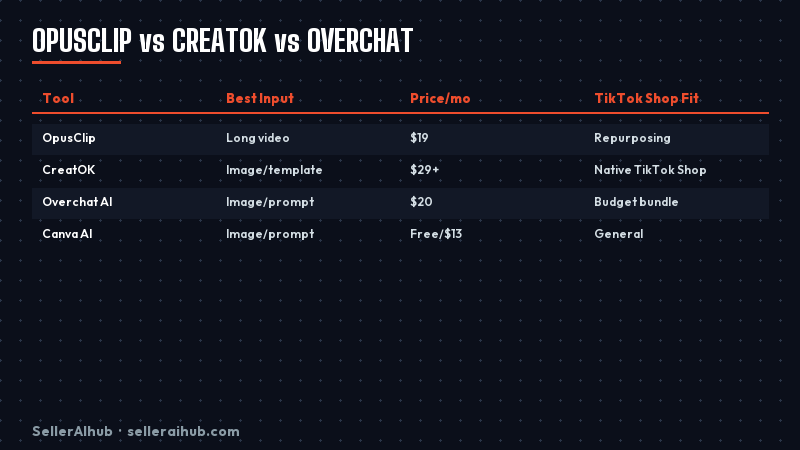
If your main need is repurposing existing long-form content, OpusClip wins on speed. If you need clips made from product photos with no source video, look at CreatOK instead — it’s purpose-built for TikTok e-commerce sellers and generates videos from images.
Should TikTok Shop sellers buy OpusClip?
Buy it if you already record long-form content — livestreams, product demos, customer testimonials. The time saved repurposing one livestream a week pays for the Pro plan in your first month. Skip it if you don’t have raw footage to feed in; you’d be paying for a tool with nothing to chew on.
The realistic SEA workflow looks like this: record 1-2 livestreams weekly → push them through OpusClip → spend 30 minutes per stream cleaning captions and trimming the bad clips → manually upload the keepers to TikTok with proper Shop tags. That’s 6-12 polished short videos a week from minimal extra effort.
FAQ: OpusClip review for TikTok Shop sellers
Does OpusClip work with TikTok Shop tagging?
OpusClip outputs the video file but does not handle TikTok Shop product tagging. You add product tags after uploading the clip in TikTok Seller Centre. There’s no native Shop integration in 2026.
Is OpusClip available in Singapore, Malaysia, Philippines?
Yes, OpusClip is fully available in all SEA markets and accepts international cards. Pricing is in USD only — no SGD or MYR billing.
Can OpusClip handle Bahasa, Tagalog, or Thai captions?
It supports them but accuracy is noticeably lower than English. Expect 60-70% caption accuracy on mixed-language streams. Plan to spend 5-10 minutes cleaning each clip’s captions.
Is the OpusClip free plan enough for a small TikTok Shop seller?
Only for trial. 60 minutes per month covers about one livestream replay. For real ongoing use, you need at least the Starter plan, ideally Pro.
OpusClip vs CreatOK — which is better for TikTok Shop?
Different tools. OpusClip turns existing long videos into clips. CreatOK generates videos from product photos with no source footage needed. Most serious TikTok Shop sellers use both — CreatOK for product showcases, OpusClip for repurposing livestreams.
Related reading: CreatOK review · TikTok Shop AI video generators · TikTok Shop seller guide
💬 Join the Discussion
Got a question or seller tip? Drop a comment below.