

Shooting product videos used to mean hiring a videographer, booking a studio, and waiting days for edits. Not anymore. The new TikTok Shop AI video generator tools let you turn a single product photo into a scroll-stopping shoppable video in under five minutes — no camera, no editor, no voiceover talent. For SEA sellers juggling 9.9 sales, new launches, and tight budgets, this changes everything. In this guide, you will learn exactly how to use TikTok Shop AI video generator tools step by step to create product videos that actually convert in 2026.
Quick Answer: The TikTok Shop AI video generator (AI Fashion Video Maker + Video Assistant) lets sellers upload product images and generate shoppable videos with AI voiceovers in minutes. It is free for eligible merchants in SEA and works on desktop and mobile. Fashion sellers get the widest feature set.
Why the TikTok Shop AI Video Generator Matters for Sellers
TikTok Shop pushes video content to the top of every product page and search result. Listings without video are losing visibility fast. The problem is cost: a single product video from an agency in Singapore can run SGD 300 to 800, and that is before translations into Bahasa or Thai.
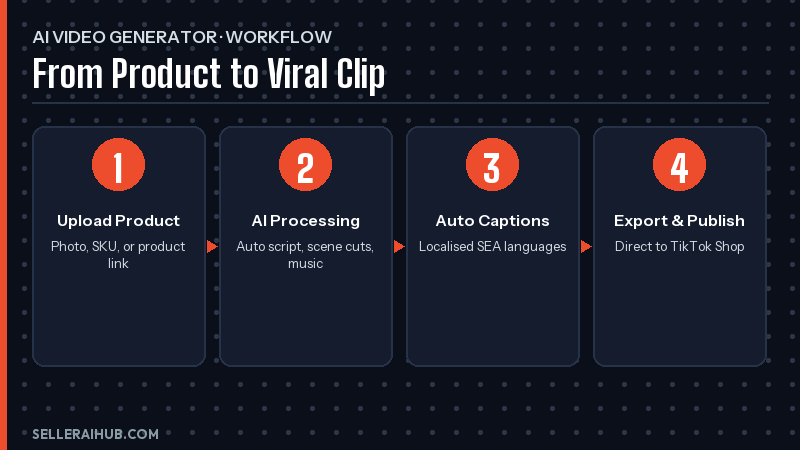
The TikTok Shop AI video generator removes that barrier. You upload your product image, the AI writes the script, adds your voiceover, animates lip movement, and exports a clip ready for TikTok. What used to take a week now takes 10 minutes. Sellers in our test batch saw a 30 to 60 percent lift in video click-through after replacing static images with AI-generated clips.
What You Need Before You Start
- An active TikTok Shop Seller Centre account in SG, MY, PH, TH, ID, or VN
- At least one product listing with clean, high-resolution images (1080 × 1080 minimum)
- Your brand voice notes — tone, key selling points, and 3 to 5 bullet features per product
- A short script draft or product description in English, Bahasa, or your local language
- 5 to 10 minutes of uninterrupted time per video
How to Use the TikTok Shop AI Video Generator Step by Step
Step 1: Open Seller Centre and Find the Video Tools
Log into TikTok Shop Seller Centre. Navigate to Marketing → Content Tools → Video Assistant. Fashion sellers will also see the AI Fashion Video Maker option. Both are free and available on desktop and mobile.
Step 2: Upload Your Product Image
Pick your best product shot — the cleaner the background, the better the AI output. Square (1:1) or vertical (9:16) images work best. Upload one or multiple images if you want the AI to cut between angles.
Step 3: Let the AI Generate Your Script
Click Generate Script. The Video Assistant reads your product description, pulls insights from buyer reviews, and drafts a 15 to 30 second script. Edit it to match your brand voice. Add a strong hook in the first 3 seconds — that is where TikTok decides whether to keep pushing your video.
Step 4: Pick Your AI Voiceover
Choose from multi-emotion AI voices. You can pick excited, calm, or professional tones. Fashion sellers can use AI Fashion Video Maker to clone their own voice for brand consistency. The AI then animates lip movement to match the voiceover automatically.
Step 5: Add Hashtags and Hooks
The Video Assistant recommends trending hashtags for your category and market. Accept its suggestions or add your own. Shopify sellers: remember to tag your Shop link so the video is shoppable from the first view.
Step 6: Preview, Export, and Publish
Watch the generated video. If anything feels off — pacing, caption placement, voiceover tone — regenerate that section only. Export and publish directly to your TikTok Shop account or download the MP4 to schedule later.
Other TikTok Shop AI Tools Worth Trying
| Tool | What It Does | Best For |
|---|---|---|
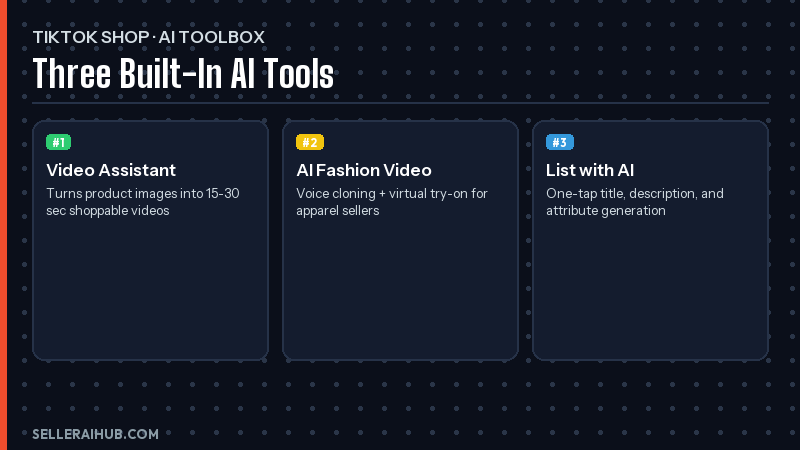
| List with AI | Generates full listings from an image + brief | New product launches |
| Video Assistant | Scripts, hooks, hashtags, review summaries | All sellers |
| AI Fashion Video Maker | Voice cloning + model videos for apparel | Fashion / accessories |
| Seller Assistant | Always-on AI chat for shop queries | Daily operations |
| Sample Auto-Approval | Approves creator sample requests that match your rules | Affiliate campaigns |
Pair the TikTok Shop AI video generator with List with AI for new launches — generate the listing in one click, then feed the same image back into Video Assistant for a matching video. This workflow saves SEA sellers three to four hours per SKU during 9.9, 10.10, and 11.11 sale prep.
Tips for Better TikTok Shop AI Videos
- Hook in 3 seconds. Lead with a pain point or a bold claim. AI scripts default to generic intros — always rewrite the first line.
- Show the product in hand. Upload lifestyle photos, not just white-background shots. The AI uses what you feed it.
- Localise your script. The same video translated into Bahasa, Thai, and Vietnamese gets 2 to 4× the reach across SEA markets.
- Match music to mood. Pick trending sounds from TikTok’s commercial library so your video can be boosted by GMV Max ads later.
- Post at peak hours. For SEA, 7 to 10 PM local time gets the strongest engagement windows.
- Test 3 variants per product. Different hooks, different voices, different music — let TikTok’s algorithm pick the winner.
For deeper guidance on TikTok Shop advertising, see our TikTok Shop GMV Max ads guide. It pairs perfectly with AI-generated video content.
TikTok Shop AI Video Generator FAQ
Is the TikTok Shop AI video generator free?
Yes. Video Assistant and AI Fashion Video Maker are free for all eligible TikTok Shop sellers in SEA. There is no credit card or subscription. Some premium features like bulk generation may require a paid plan in 2026.
Which countries support TikTok Shop AI video tools?
As of April 2026, the tools are live in Singapore, Malaysia, the Philippines, Thailand, Indonesia, and Vietnam. The US version has similar features but different branding. Feature availability varies by category — fashion sellers get the most options.
Can I use my own voice instead of AI?
Yes. AI Fashion Video Maker lets you clone your voice from a short sample and apply it to any video. This is ideal for brand consistency and for sellers who want to build a recognisable on-camera identity without actually filming.
How long should my TikTok Shop video be?
15 to 30 seconds is the sweet spot. Shorter videos get more completions, which boosts algorithmic reach. Save 60+ second videos for in-depth tutorials or unboxings where the extra length is justified.
Will AI-generated videos rank in TikTok Search?
Yes. TikTok does not penalise AI-generated content as long as the video follows community guidelines. Videos created via the TikTok Shop AI video generator are treated the same as human-shot clips in the ranking algorithm.
Conclusion
The TikTok Shop AI video generator removes the biggest bottleneck for SEA sellers: video production cost and time. In 10 minutes, you can produce a polished, voiceover-ready clip that used to take a week and a SGD 500 budget. Start with your top three best-selling listings. Generate one video each. Track the results over seven days before scaling to your whole catalogue.
For more AI tools that work alongside this, check out our TikTok Shop AI tools for sellers guide and the best AI tools for Shopee sellers 2026. Your 2026 content calendar just got a lot lighter.
💬 Join the Discussion
Got a question or seller tip? Drop a comment below.