
Step-by-Step: Shopee Ads AI Optimization Workflow
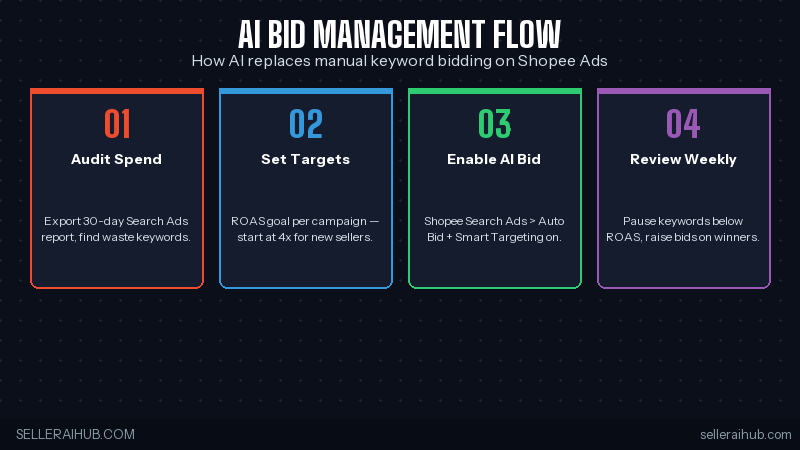
Step 1: Audit 30 Days of Spend
Tips to Get the Most Out of Shopee Ads AI Optimization
- Don’t fight the learning phase — give AI 7 full days before judging performance
- Refresh creative monthly — even winning thumbnails fatigue after 30 days
- Watch competitor prices — a SplitDragon alert beats a manual check
- Pair with Shopee Coins promotions — boosts conversion on AI-bid traffic
- Export weekly to Google Sheets — Shopee’s in-platform reporting hides trends
Shopee Ads AI Optimization 2026 FAQ
How long until Auto Bid starts working?
3–7 days for the first signal, 14 days for stable performance. Don’t toggle it off during the learning phase — that resets the model.
Is Shopee’s AI bidding free?
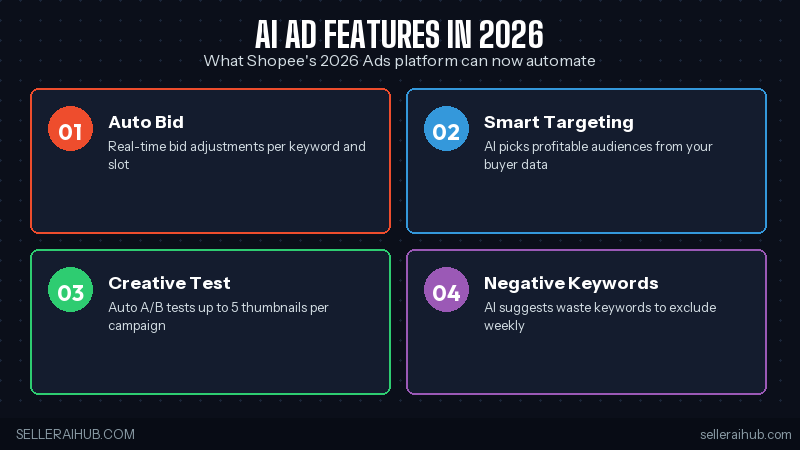
Yes — Auto Bid, Smart Targeting, and Creative Test are all free features inside Shopee Ads. You only pay for the ad spend itself.
Should I use external bid management tools?
Most SEA sellers don’t need to. Shopee’s native AI bidding has caught up with third-party tools as of 2026. External tools only make sense if you’re spending SGD $10K+/month.
What ROAS target is realistic for new sellers?
4× is realistic for new SKUs in months 1–3. By month 6 most well-optimized stores hit 6×+ on Shopee Search Ads.
Conclusion: Three Takeaways
- Turn on AI bidding everywhere — manual bidding is now actively losing money in SEA
- Run a weekly waste audit — 20–30% spend cuts are sitting in your bottom-30% keywords
- Refresh creative monthly — AI bidding amplifies thumbnail fatigue, not reverses it
Want more? Read our TikTok Shop GMV Max ads guide for the cross-platform playbook, or jump to the Shopee search algorithm updates 2026.
💬 Join the Discussion
Got a question or seller tip? Drop a comment below.