

Shopee rolled out search algorithm updates in 2026 that are reshaping which listings rank on page one — and which drop off. If your impressions are flat or your conversion rate has quietly dipped, the Shopee search algorithm 2026 updates may be the reason.
Quick Answer: Shopee’s 2026 algorithm updates place greater weight on listing quality scores, CIM (conversion-impression metrics), and product tags. Sellers who fix these three areas first are seeing the fastest ranking recovery — usually within 7–14 days.
What Changed in the Shopee Search Algorithm in 2026
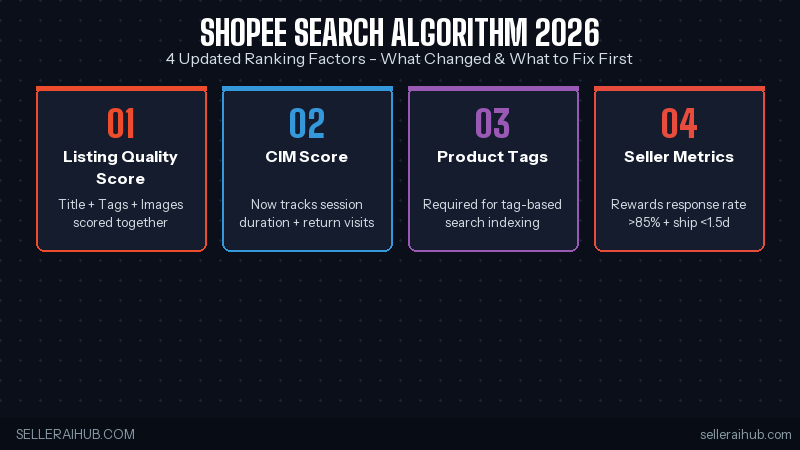
Shopee hasn’t published an official changelog, but ranking shifts observed across SG, MY, and PH stores — plus data shared in seller communities — point to four key updates:
| Ranking Factor | Before 2026 | 2026 Update |
|---|---|---|
| Listing Quality Score | Moderate weight | Higher weight — title, tags, and images all scored together |
| CIM Score | Primarily conversion-based | Now includes session duration and return visits |
| Product Tags | Optional, low impact | Required for full indexing in tag-based search |
| Seller Metrics | Penalises poor performers | Actively rewards top-tier response rate and shipping speed |
How to Adapt to the Shopee Search Algorithm 2026 Updates: 5 Steps
You don’t need to rebuild your store. Work through these steps in order — they target the highest-impact factors first.
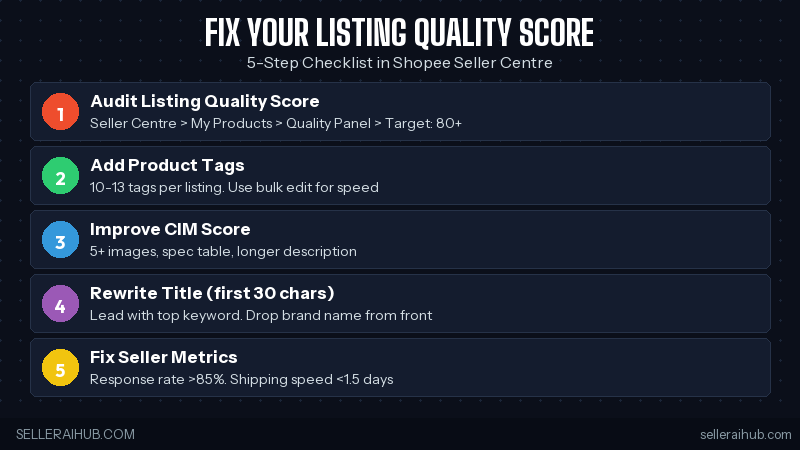
Step 1: Audit Your Listing Quality Score
Open Seller Centre → My Products, select any listing, then check the Listing Quality Score panel. Aim for 80 or above. The most common gaps are missing product tags, low-resolution images, and titles under 30 characters. Fix your top 20 listings first — they drive the most impressions.
Step 2: Add Product Tags to Every Listing
Product tags are now a hard indexing requirement for Shopee’s tag-filtered search — a growing share of buyer queries in 2026. Listings without tags may not appear in those results at all. Add 10–13 tags per listing using buyer-language terms like “wireless”, “waterproof”, or “under SGD 20”. Use Seller Centre’s bulk edit tool to update multiple listings at once.
Step 3: Improve Your CIM Score with Better Listing Pages
CIM now tracks session depth — how long buyers stay on your listing page. The fastest way to lift it: add a longer description with bullet-point benefits, a size or spec table, and at least five product images. Each element keeps buyers on-page longer, which the algorithm reads as a quality signal.
Step 4: Rewrite Titles to Lead with Keywords
The updated keyword scoring weights the first 30 characters of your title more heavily than before. Lead with your highest-volume keyword, then add key attributes — colour, size, or pack count. Avoid leading with your brand name unless buyers actively search for it.
Step 5: Check Seller Metrics in Your Performance Dashboard
Go to Seller Centre → My Account → Seller Performance Dashboard. The 2026 update rewards sellers with a chat response rate above 85% and an average shipping speed under 1.5 days. If either metric falls below target, fix it before anything else — no amount of listing optimisation will overcome a poor seller rating.
For a full breakdown of every ranking factor, read our in-depth guide: How to Rank Higher on Shopee Search in 2026.
Why the Shopee Search Algorithm 2026 Updates Matter for SEA Sellers
Shopee’s seller base across SG, MY, PH, TH, and ID has grown sharply since 2024. More competition means the algorithm works harder to separate quality listings from low-effort ones. The 2026 updates are Shopee’s response: reward sellers who invest in listing quality, and push down those who don’t.
For established sellers, this is an opening. Many newer entrants haven’t optimised tags or CIM scores yet. Sellers who move fast on the checklist above can recover lost ground within two to four weeks — before competitors catch on.
Quick Tips to Work With the 2026 Algorithm
- Batch-fix tags first — use Seller Centre’s bulk edit to tag your top 20 listings in one session.
- Add a spec table to every listing — it’s the single fastest way to raise session duration and CIM score.
- Set up Shopee’s auto-reply — keeps your response rate above 85% during off-hours without extra effort.
- Only Boost listings with a quality score of 75+ — Boost works with the algorithm, not against it. Low-score listings waste your Coins.
- Re-audit after 14 days — algorithm score updates aren’t instant. Check back two weeks after making changes to measure the impact.
Shopee Search Algorithm 2026 Updates — FAQ
Did Shopee officially announce these algorithm updates?
No official announcement was made. The changes were identified through seller community reports and listing performance data observed across SG, MY, and PH markets in early 2026. Shopee rarely publishes algorithm changelogs, so monitoring ranking shifts and quality score changes in Seller Centre is the most reliable signal.
How long does ranking recovery take after optimising?
Most sellers see visible ranking movement within 7–14 days of fixing listing quality scores and product tags. Full recovery in competitive categories typically takes 3–4 weeks. High-volume listings tend to respond faster than long-tail SKUs.
Do the 2026 algorithm updates affect all Shopee markets the same way?
The core ranking factors — listing quality, CIM, tags, seller metrics — apply across all SEA markets. However, benchmarks like shipping speed targets may differ by country. Sellers operating across multiple markets should check Seller Centre performance metrics per region separately.
Bottom Line
The Shopee search algorithm 2026 updates reward the basics done well: complete product tags, clean titles, strong CIM scores, and healthy seller metrics. None of this requires paid tools — just a focused audit session in Seller Centre.
Start with your top 20 listings, work through the five steps above, and check back in two weeks. For the full ranking playbook, read: How to Rank Higher on Shopee Search in 2026.
💬 Join the Discussion
Got a question or seller tip? Drop a comment below.