

Quick Answer: This Shopdora review finds it most useful as a Shopee research layer beside Seller Centre. Use it to inspect product trends, keyword signals, competitor movement, and price context. Do not treat any third-party data tool as your only source of truth; validate every insight against your own store data before changing listings, ads, or inventory.
Seller Centre tells you what happened inside your own store. A research tool can help you ask broader market questions, such as which products are moving, which keywords show demand, and how competitor prices are changing. This Shopdora review explains where Shopdora fits for Shopee sellers in Southeast Asia.
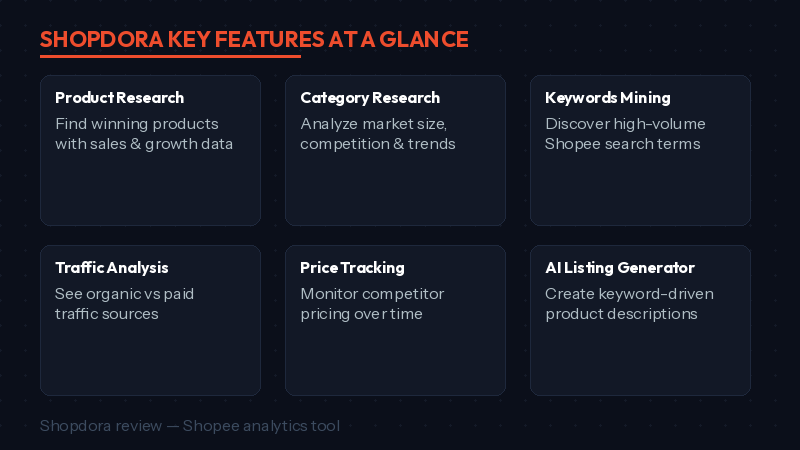
The official Shopdora site currently positions the product around Shopee analytics, product research, keyword insights, competitor monitoring, and a browser extension. Pricing and plan limits can change, so this review focuses on workflow fit instead of frozen price claims.
Shopdora Review: What It Appears to Do
Shopdora is built for Shopee research workflows. The official site describes a web app plus browser extension that can help sellers review product details, shop details, keyword trends, multi-variant product data, sales and price signals, and downloadable marketplace context while browsing Shopee.
| Workflow | How a seller can use it | Validation step |
|---|---|---|
| Product research | Look for categories or products with visible demand signals. | Check margin, supplier reliability, and local competition before buying stock. |
| Keyword research | Find buyer phrases to test in titles, descriptions, or ads. | Compare with your Seller Centre search and ad data. |
| Competitor monitoring | Watch price, ranking, and listing movement around campaign periods. | Do not copy blindly; understand offer, reviews, and fulfilment. |
| SKU insight | Inspect variant-level differences such as color, size, or bundle demand. | Confirm with your own sales mix and stock risk. |
| Browser extension | Review data while browsing Shopee product pages. | Check data freshness and permissions before relying on it. |
Best Fit and Skip If
| Best fit | Skip or delay if |
|---|---|
| You manage enough SKUs that manual competitor checks are slow. | You only sell a few products and already know your niche well. |
| You need Shopee keyword and price context before campaigns. | You only need basic store reporting from Seller Centre. |
| You compare products across multiple SEA markets. | You cannot act on the insights with listing, price, stock, or ad changes. |
| You want a browser extension workflow while browsing Shopee. | You are not comfortable granting extension permissions to a data tool. |
What to Verify Before Paying
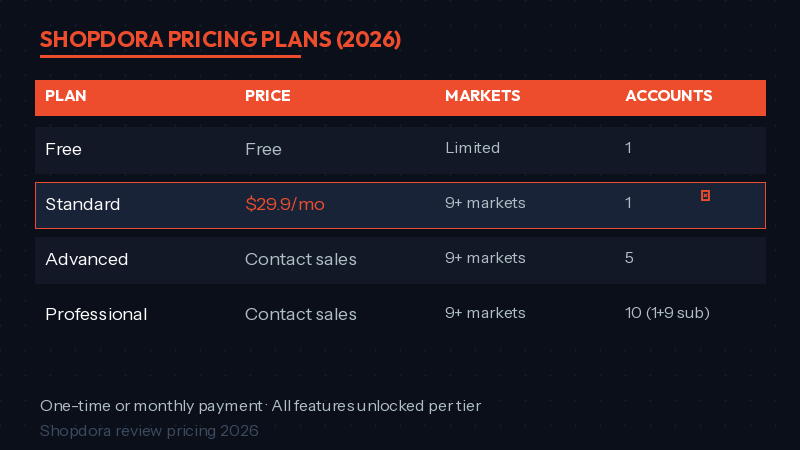
Because software pricing and limits change, verify the live Shopdora pricing page and checkout before you commit. Do not rely on old screenshots, old reviews, or static plan numbers.
- Current plan price, currency, billing period, and renewal terms.
- Trial length and whether it covers the web app, extension, or both.
- Supported Shopee markets that matter to your store.
- Keyword, product, monitoring, export, and AI limits by plan.
- Whether team seats, sub-accounts, or agency workflows are included.
- Data privacy, extension permissions, and cancellation process.
How to Test Shopdora in 60 Minutes
A good trial should answer a real business question. Do not click around randomly. Pick one product category, one campaign period, or one listing problem first.
- Choose one target product or category.
- Record your current Seller Centre baseline: impressions, CTR, conversion, price, stock, and ad spend.
- Use Shopdora to inspect keyword, price, and competitor signals.
- Write down three possible actions, such as title cleanup, price test, voucher change, or new bundle.
- Apply only one or two changes to avoid confusing the result.
- Review Seller Centre performance after 7-14 days.
This makes Shopdora a decision tool, not a dashboard you check for entertainment. The value comes from better action, not more charts.
Strengths to Consider
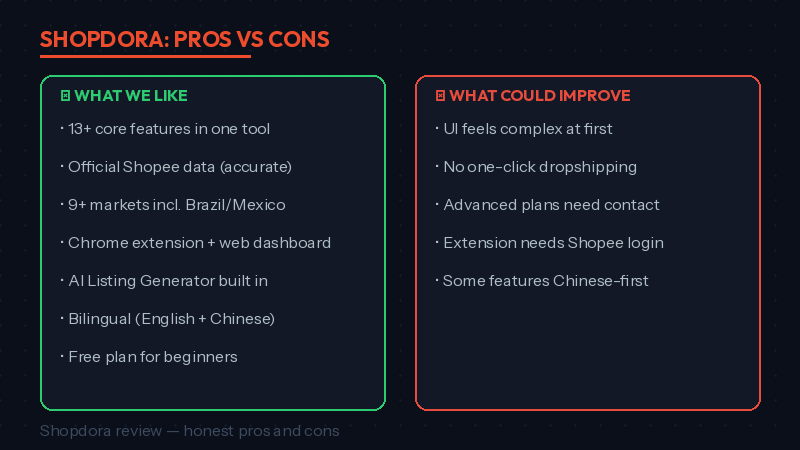
- Shopee-specific positioning, which is more relevant than generic Google SEO tools for marketplace sellers.
- Browser extension workflow for checking data while browsing Shopee pages.
- Useful feature categories around product research, keyword signals, monitoring, pricing context, and competitor checks.
- Potential fit for sellers preparing for 9.9, 11.11, payday campaigns, or category expansion.
Limitations to Consider
- Third-party marketplace data may not match your own store dashboard perfectly.
- Pricing, plan limits, market coverage, and trial rules should be checked live.
- New sellers may find the tool distracting if they do not know what decision they are trying to make.
- A data tool cannot fix weak products, poor margins, slow fulfilment, bad reviews, or unclear listing photos by itself.
Shopdora vs Seller Centre
Seller Centre remains the source of truth for your own store performance. Shopdora is more useful for external context: competitor movement, market signals, product ideas, and keyword discovery. You need both views before making campaign decisions.
| Question | Seller Centre | Shopdora-style research |
|---|---|---|
| How did my listing perform? | Best source. | Use as supporting context only. |
| What are competitors doing? | Limited. | Useful for external checks. |
| Which keyword should I test? | Useful after your listing has data. | Useful before testing and during research. |
| Should I buy more stock? | Shows your own sell-through. | Helps inspect wider market movement. |
Internal Links for the Full Workflow
Use this review with Shopdora dashboard guide, Shopdora pricing breakdown, rank higher on Shopee search, and write Shopee product description with AI.
You can also check the official Shopdora site and the Shopdora Chrome Web Store listing before installing or paying.
Frequently Asked Questions
Is Shopdora useful for new Shopee sellers?
It can be useful, but only if you have a clear question. New sellers should start with one category, one product idea, or one listing problem instead of trying to use every feature at once.
Does Shopdora replace Seller Centre analytics?
No. Seller Centre is still the source of truth for your own store. Shopdora can add market and competitor context, but you should validate actions against your own data.
Is Shopdora pricing fixed?
Pricing and plan limits can change. Check the live pricing page, checkout terms, and trial details before you budget around any plan.
What should I test first in Shopdora?
Start with one listing or category. Compare keyword, competitor, and price signals, then choose one action that you can measure in Seller Centre after 7-14 days.
Is this review a recommendation?
It is a cautious fit recommendation. Shopdora can be useful for sellers who will act on market data, but it is not necessary for every small store or every product category.
Final Verdict
The practical verdict from this Shopdora review is that Shopdora is worth testing when your next decision depends on market context, not just your own store dashboard. Use it for product, keyword, price, and competitor questions. Then let Seller Centre prove whether the action helped.
💬 Join the Discussion
Got a question or seller tip? Drop a comment below.